
When you land on EyeZy’s website, the promises sound almost too good to resist: complete visibility into a child’s phone, social media monitoring, GPS tracking, and more—all wrapped in a polished design. But behind that glossy exterior, there are plenty of red flags.
For starters, EyeZy is widely believed to be a rebrand of mSpy, one of the most notorious monitoring apps on the market. Both apps share similar paywalls, identical subscription traps, and costly pricing tiers that quickly add up. You can’t even browse much of the EyeZy site without hitting a paywall, which feels more like a sales funnel than a family safety solution.
And the reviews? A quick glance at Trustpilot tells the story: negative reviews about billing issues, hidden limitations, and features that don’t work as advertised, often buried under a flood of suspiciously positive ones. Even worse, EyeZy has been accused of disguising the availability of features on iOS—claiming you can access social media and message monitoring when, in reality, iOS restrictions make many of those promises impossible without jailbreaking.
In this review, we’ll break down how EyeZy really works, what you can (and can’t) expect, and why parents looking for transparency and reliability may want to think twice before buying into the hype.
EyeZy Review
🔍 Quick Verdict on EyeZy
EyeZy promises to be an all-in-one parental control app with deep monitoring features—but the reality is far less impressive. While its Android app does provide some insights into location and phone activity, many “premium” features are locked behind hidden paywalls or require risky device rooting. On iOS, it splits between a watered-down iCloud method and a Life360-style family tracker, neither of which deliver the promised social media monitoring. Combined with confusing pricing and poor support, EyeZy feels more like an overhyped rebrand of mSpy than a reliable family tool.
✅ Pros
- Polished interface and dashboard
- Basic GPS tracking works on Android
- App Store iOS app includes geofencing & SOS alerts
❌ Cons
- Social media monitoring unreliable or unavailable
- Hidden upsells & extra charges after subscribing
- Support reported as unhelpful or unresponsive
- Only one device per license
EyeZy has the looks and marketing budget, but not the substance. Too many promises fall flat, especially on iOS. For parents who need stable monitoring across multiple devices, Family Orbit is the safer, more transparent alternative.
How Does EyeZy Work on Android?
EyeZy’s pitch for Android users is simple: install their app, and you’ll unlock deep access into your child’s or partner’s phone. On paper, it claims to give you everything—social media monitoring, GPS tracking, browsing history, keylogging, even deleted messages. But here’s what really happens.
Installation and Setup
Unlike Scannero or Famio, which rely on web-based tricks, EyeZy requires you to physically install the app on the target Android device. That means you need direct access to the phone and a few minutes of uninterrupted time. The installation process involves:
- Downloading the EyeZy APK (not available in the Play Store).
- Adjusting Android security settings to allow installation from unknown sources.
- Granting a long list of permissions—location, notifications, accessibility, background activity, and more.
For less tech-savvy parents, this step alone can feel intimidating, especially since the instructions are buried behind EyeZy’s paywall.
Features in Action
Once installed, EyeZy activates several monitoring features. From the Android dashboard, you can see:
- GPS tracking: real-time location updates with decent accuracy.
- Social apps access: claims to show chats from WhatsApp, Messenger, Snapchat, Instagram. Some work, but others are patchy or require extra device permissions.
- Phone activity: call logs, SMS, browsing history, and photos.
- Keyword alerts & keylogger: useful for spotting sensitive topics, though not always reliable.
However, not everything works as smoothly as advertised. Social media monitoring, in particular, is often incomplete—messages may not load, or only partial conversations appear.
Limitations on Android
EyeZy doesn’t require rooting for basic features, but advanced monitoring (like some app chats or hidden/deleted messages) often only works on rooted devices. That’s a big barrier for average parents, since rooting is complex and can void warranties.
Battery drain is another issue: running EyeZy in the background can quickly chew through a phone’s charge, which can raise suspicion if the child notices unusual battery behavior.
Bottom Line on Android
EyeZy on Android offers more than the “phone number lookup” scams like Scannero—but it’s not without its headaches. You need physical access to install it, many features don’t work unless you root the device, and even then, results are inconsistent. For parents looking for a balance between usability and reliability, it’s far from the seamless, all-powerful app the marketing suggests.
How Does EyeZy Work on iPhone?
EyeZy’s iPhone strategy is a tale of two products. Depending on what you sign up for, you’ll either get a cloud login system (iCloud method) or their App Store app (family tracker). On the surface, both are pitched as all-in-one monitoring, but in practice, neither delivers on the full set of features advertised.
The iCloud Method
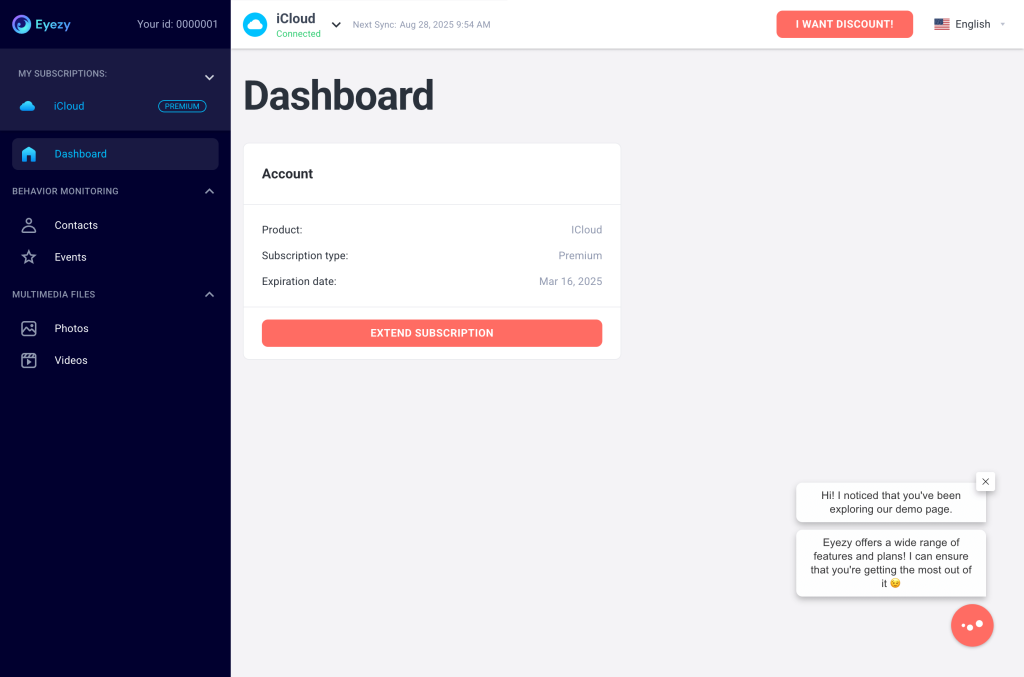
EyeZy promotes cloud-based monitoring as a way to access texts, calls, photos, and even social media without touching the device. In reality, you’ll need your child’s Apple ID and password, plus physical access to bypass two-factor authentication. Even then, the monitoring is limited to whatever data is included in iCloud backups—meaning:
- No real-time updates (only when backups sync).
- No access to WhatsApp, Snapchat, or Instagram chats.
- No geofencing or alerts.
- Frequent sync issues if iCloud settings change.
This is the same limitation that plagues many monitoring apps claiming “instant iPhone monitoring.”
The App Store Method
EyeZy also offers a family tracking app on iOS, downloadable directly from the App Store. This version looks and behaves much more like Life360 than a spy app:
- Real-time location sharing between parent and child.
- Historical location timeline.
- Geofencing alerts when someone enters or leaves set zones.
- SOS/help alerts if the child taps for assistance.
But here’s the catch: it requires installation on both devices with explicit consent, and it only provides location-related features. You won’t get message monitoring, social media logs, or other “deep access” features EyeZy heavily markets on its website.
Bottom Line on iOS
EyeZy presents itself as a one-stop monitoring solution, but on iPhone it’s split between a limited iCloud backup method and a Life360-style family tracker app. Neither provides the full suite of features promoted in their ads. This leaves many buyers feeling misled—especially those expecting WhatsApp or Snapchat monitoring on iOS, which simply isn’t possible without jailbreaking.
Feature Reality Check
EyeZy’s website is packed with bold claims: monitor social media, read messages, track GPS, set up geofences, and even log keystrokes. But when you actually test it, the story changes—especially on iOS, where many of those features are either limited or completely unavailable.
Here’s a side-by-side look at what EyeZy promises vs what you really get:
Feature Reality Check: EyeZy Promises vs. Reality
| Feature | What EyeZy Promises | Reality |
|---|---|---|
| Social Media Monitoring | Full access to WhatsApp, Snapchat, Instagram, Messenger, Telegram, etc. | On Android: some apps show partial chats, others fail or require rooting. On iOS: mostly unavailable unless jailbroken. |
| GPS Tracking | Real-time, precise location updates. | Works decently on Android. On iOS, only works with the App Store family tracker, not via iCloud login. |
| Geofencing | Custom alerts when someone enters/leaves a zone. | Available in the App Store iPhone app, but not through iCloud method. On Android, works but drains battery heavily. |
| Keylogger / Keyword Alerts | Records keystrokes and sends alerts for sensitive words. | Partially works on Android with accessibility permissions. Not available on iOS without jailbreak. |
| File & Media Access | See all photos, videos, and files on the device. | Works on Android with full permissions. On iOS, limited to what’s in iCloud backups—no live access. |
| Installation | Quick and easy setup, no hassle. | Android: requires APK install + lots of permissions. iOS: either use Apple ID (with 2FA hurdles) or install the family tracker app on both devices with consent. |
My Hands-On Test with EyeZy
After trying EyeZy myself, my experience lined up almost perfectly with what so many reviewers on Trustpilot and app stores are already saying.
Pricing Surprises
When I first landed on the checkout page, I saw the usual subscription choices—1 month, 3 months, 12 months. It looked straightforward. But once I subscribed, I quickly realized I was being pushed toward additional “premium” and “family” plans that weren’t clearly mentioned beforehand. What started as a “cost-efficient annual plan” quickly ballooned into hundreds of dollars in unexpected upsells if I wanted access to the very features advertised on the homepage.
Missing Features
After installation, the disappointment continued. The app dashboard looked polished, but half the features EyeZy had promised were simply not there. GPS location worked for a while, but when I tried to check messages and social media chats, I hit another paywall. At one point, the app even prompted me to upgrade again—after I had already paid for a yearly subscription. This echoes what one reviewer described: “I bought the 1 year subscription… after I installed the app and paid, the app was not showing me half of what it advertised. They want almost $400 extra to do as advertised!”
Support Frustrations
Thinking it was maybe a technical glitch, I reached out to customer support. To my surprise, I was asked to pay an additional fee for “premium support.” That alone felt like a joke—why should basic support be a paid add-on? Worse, the support email kept bouncing back, and chat replies were generic copy-paste answers from what seemed like a bot.
Poor Reliability
Even the features that did work weren’t stable. Location tracking lagged or stopped altogether. One reviewer mentioned the app being flagged by other apps as spyware, which I also saw—it interfered with normal phone functions and drained the battery. Others had trouble even logging in consistently: the app wouldn’t recognize their account, despite showing charges in the Play Store or App Store.
Overall Impression
EyeZy looks slick on the surface, but my actual experience was a frustrating cycle of false advertising, hidden costs, missing features, and useless support. At best, you get basic GPS tracking. At worst, you’re out of money with nothing close to the monitoring suite that EyeZy markets so aggressively.
💸 EyeZy Pricing – Confusing and Costly
| Plan | Advertised Price* | Reality Check |
|---|---|---|
| 1 Month | $38.39/mo | Short-term but still expensive; often upsells after purchase. |
| 3 Months | $22.39/mo (billed $39.99 upfront) | Advertised as “most popular” but still adds hidden charges. |
| 12 Months | $7.99/mo | Looks cheap, but renews at full price + unexpected upsells (premium plans, “support” fees). |
✅ Family Orbit – A Fair Offer
| Plan | Price | What You Get |
|---|---|---|
| 7-Day Trial | $7 (one-time) | Test all features before committing. Cancel anytime. |
| Monthly Plan | $29.95/mo | Full monitoring: GPS, history, geofencing, SMS, calls, photos, apps, AI alerts. |
EyeZy vs Family Orbit: Pricing at a Glance
| Category | EyeZy | Family Orbit |
|---|---|---|
| Trial | No real trial, discounted entry plan only | 7-day trial for $7 with full features |
| Monthly Plan | $38.39 (1-month plan) | $29.95 flat rate |
| Annual Plan | $7.99/mo (renewals at full price) | Same $29.95/mo (no renewal spikes) |
| Hidden Costs | Extra fees for “premium features” and even support | All features included, support free |
| Devices Per License | 1 device only | Up to 5 devices (perfect for families) |
Family Orbit – A Smarter Alternative
If you’re done wrestling with upsells, missing features, and one-device limits, Family Orbit is the grown-up choice. It’s built specifically for parents, with the right mix of real-time safety features and privacy-first design—no gimmicks, no “premium support” paywalls, and no gotcha renewals. You get coverage for the whole household (up to 5 devices per plan), consistent GPS tracking that doesn’t vanish after one ping, and tools that actually help you parent: geofencing, history, alerts, and meaningful activity insights.
Why it clicks for families
- Designed for kids, managed by parents: Parent-only access, consent-based setup.
- Always-on safety: Continuous GPS, geofence enter/exit alerts, and location history.
- Covers the whole crew: Up to 5 devices per license—no nickel-and-diming for each child.
- Transparent pricing: 7-day trial for $7, then $29.95/mo—support included.
- Privacy first: No data reselling, clear policies, and a brand that doesn’t hide behind vague claims.
| What You Get | Family Orbit |
|---|---|
| Devices per License | Up to 5 devices (one or more children) |
| Location Safety | Real-time GPS, location history, geofence alerts |
| Parental Insights | (Platform-appropriate) SMS & call logs, photos/apps checks, activity reports, smart alerts |
| Privacy & Trust | No data reselling, clear consent, parent-managed access |
| Pricing | 7-day trial for $7 → $29.95/mo, support included |
| Category | EyeZy | Family Orbit |
|---|---|---|
| Devices per License | 1 device | Up to 5 devices |
| Location Capabilities | Android app; iOS app (location only) or iCloud (backup-based) | Continuous GPS, geofencing, history on supported platforms |
| Geofencing & Alerts | Limited / dependent on app method | Built-in enter/exit alerts + customizable zones |
| Parental Monitoring | Patchy; many features upsold or unreliable | Practical insights (texts/calls on Android), photos/apps checks, reports |
| Pricing & Upsells | Discounted entry; renewal spikes + add-on fees | $29.95/mo, support included, no hidden tiers |
| Who It’s For | Solo device monitoring, mixed results | Families with multiple kids needing reliable, ongoing safety |
Family Orbit focuses on reliable parenting features and clear value. You’re not paying to “unlock” what was promised; you’re getting a full toolkit that helps you keep kids safe without turning your home into a surveillance state. If you need ongoing peace of mind across multiple devices, this is the option that won’t fight you back.
FAQs About EyeZy
What is the EyeZy app about?
EyeZy markets itself as a parental control and monitoring app. On Android, it claims to track location, monitor calls, texts, and social media. On iOS, it offers either an iCloud login method (limited to backup data like photos, contacts, and call logs) or an App Store family tracker app that behaves more like Life360, with real-time GPS, geofencing, and alerts. In practice, many advanced monitoring features don’t work as advertised—especially on iPhones.
How to hide EyeZy app on iPhone?
The App Store version of EyeZy is a family tracker, not a stealth app, so it cannot be hidden on iPhones. It requires installation with consent and will be visible like any other app. EyeZy’s claims about “invisible mode” apply mostly to Android, where the app can run in the background—but even then, it may trigger antivirus or battery drain alerts.
How to install EyeZy on a target phone?
For Android, you must download the EyeZy APK (not from Google Play), enable “install from unknown sources,” and grant a long list of permissions. For iPhones, you either log in with the child’s Apple ID (for limited iCloud monitoring) or install the EyeZy app from the App Store on both the parent’s and child’s devices, with the child’s consent. In both cases, you need physical access to the target phone—it cannot be installed remotely by just entering a phone number.
Does EyeZy work on iPhone?
Yes, but with significant limitations. The iCloud method only shows backup data (not live chats or deleted messages). The App Store app does provide location sharing, history, geofencing, and SOS alerts, but it does not offer the deep monitoring EyeZy advertises on its website. Features like WhatsApp, Snapchat, and Instagram monitoring do not work on iOS unless the phone is jailbroken.
EyeZy customer support: who’s behind it?
EyeZy is operated by FORTUNEX LIMITED, based in Cyprus. Their listed support details are:
📍 Shop 17, 83 Georgiou A, Germasogeia 4047, Cyprus
📧 [email protected], [email protected]
☎ +357 96 598763
However, many users report that EyeZy’s customer support is unresponsive or automated, and some reviewers say refund requests go unanswered.
Final Verdict: Is EyeZy Worth It?
EyeZy makes big promises. Its website and ads push the idea of “all-in-one monitoring” that can give parents complete visibility into their child’s digital world. But after testing it and digging through countless user reviews, the reality is clear: EyeZy doesn’t live up to the hype.
On Android, you may get some functionality—but only if you’re willing to wrestle with APK installs, endless permissions, and even rooting the device for advanced features. On iOS, things are even more limited: either a watered-down iCloud method that delivers only backups, or an App Store family tracker app that behaves more like Life360 than a true monitoring tool.
Add to that the confusing pricing, hidden upsells, and poor customer support (some users even being asked to pay extra just to get answers), and EyeZy starts to feel less like a family tool and more like a clever sales funnel.
For parents who genuinely want to keep their kids safe, a monitoring app should be transparent, reliable, and family-focused—not patchy, paywalled, and misleading. That’s why Family Orbit stands out as the smarter alternative: one plan, up to five devices, full GPS history and geofencing, parental insights, and clear pricing with no tricks.
- Monitor Calls & Text Messages
- View Photos and Videos
- Location Tracking & Geofence
- Monitor WhatsApp & Kik
- Detect & Alert for Inappropriate Activities
- Monitor Websites Visited
- Compatible with Android and iOS