
KidLogger is one of the few monitoring tools that still offers a permanent free plan, and on paper it sounds unusually generous. It can record application use, websites, locations, calls, text messages and other activity across Android phones and computers. Some paid features go much further, including screenshots, keystroke records, chat monitoring, audio recording and call recording on supported devices.
That is a lot of visibility for a product whose paid plans start at only a few dollars per month. But a long list of monitoring features does not automatically make a good parental-control app. Parents also need clear setup instructions, reliable alerts, sensible privacy protections and tools that help them act—not just a giant archive of everything a child did on a device.
This KidLogger review looks at what the service currently offers, how its free and paid plans differ, which devices it meaningfully supports, and where its old-school activity-logging approach may fall short for modern families. We will also explain the important difference between recording activity and actually helping parents manage screen time, location and online safety.
How this review was prepared: We checked KidLogger’s current feature pages, Android documentation, plan comparison, public dashboard demo, privacy information, support resources and terms on July 29, 2026. Features can vary significantly by operating system and Android version. Any function marked as requiring verification should be confirmed on your own device before paying.
KidLogger Review: Quick Verdict
🔍 Our Quick Verdict on KidLogger
KidLogger offers an impressive amount of raw monitoring data for very little money. Its permanent free tier, support for up to five devices and strong Windows and Android logging make it attractive to technically confident parents. The downside is that the product feels more like an activity recorder than a polished family-safety platform. Features vary sharply by device, iPhone support is effectively absent from the current compatibility list, and parents may have to dig through large quantities of logs instead of receiving clear, actionable safety alerts.
✅ Pros
- Permanent free plan for up to five devices
- Low-cost Standard and Professional plans
- Detailed Android and computer activity logs
- Supports Android, Windows, macOS and Linux
- Useful public dashboard demo and extensive documentation
- Optional end-to-end encryption is available for newer accounts
❌ Cons
- No meaningful iPhone monitoring in the current platform list
- Interface and documentation can feel dated or inconsistent
- Advanced Android setup may be too technical for some parents
- Many features are passive logs rather than immediate safety tools
- Highly intrusive functions require careful consent and privacy decisions
- Feature availability depends heavily on platform and subscription
Best for: Budget-conscious and technically comfortable parents who primarily want detailed activity records from Android phones or family computers.
Skip it when: Your family mainly uses iPhones, you want a polished parent mobile app, or you need simple geofences, family location, screen-time controls and meaningful alerts rather than raw surveillance-style logs.
What Is KidLogger?
KidLogger is a device-monitoring and parental-control service developed by SafeJKA S.R.L. It installs monitoring software on a child’s Android phone, Windows computer, Mac or Linux device and uploads selected activity records to an online account. A parent can then open the KidLogger dashboard in a browser and review the collected information remotely.
The service is built around activity logging. Depending on the device and plan, it may collect information such as application usage, websites, device time, GPS coordinates, calls, SMS messages, notifications, screenshots, keystrokes, photos, audio and chat activity. KidLogger also advertises some control functions, including app blocking and time restrictions on supported platforms.
That makes KidLogger different from simpler tools such as Google Family Link or Apple Screen Time. Those products mainly help parents set limits and approve apps. KidLogger is more interested in showing a detailed record of what happened on the device.
Collecting more data does not always make parents better informed. A dashboard full of screenshots, keystrokes and chronological logs can still be less useful than a service that highlights the few events that genuinely require attention.
Which Devices Does KidLogger Support?
At the time of this review, KidLogger’s official compatibility information listed Android 8–16, Windows 7–11, macOS 12–14 and Ubuntu 22–24. The exact features are not identical across those platforms.
🤖 Android
KidLogger’s broadest mobile feature set. Depending on the agent and plan, it can cover apps, location, calls, SMS, websites, notifications, photos and selected advanced recording functions.
🖥️ Windows
Strong for computer activity logs, including applications, websites, screenshots, files, external drives and—on the appropriate plan—keystroke monitoring.
🍎 macOS
Supports activity monitoring and selected screenshots, web and messaging logs, although current compatibility information should be checked against your exact macOS version.
📱 iPhone
KidLogger does not currently list iOS as a supported monitoring platform on its main compatibility page. iPhone families should treat KidLogger as unsuitable unless the company confirms a new supported iOS method.
The lack of meaningful iPhone support is a major limitation. A parent who needs to monitor both an Android phone and an iPhone will not get a consistent experience from KidLogger. This alone may rule it out for mixed-device families.
How Does KidLogger Work?
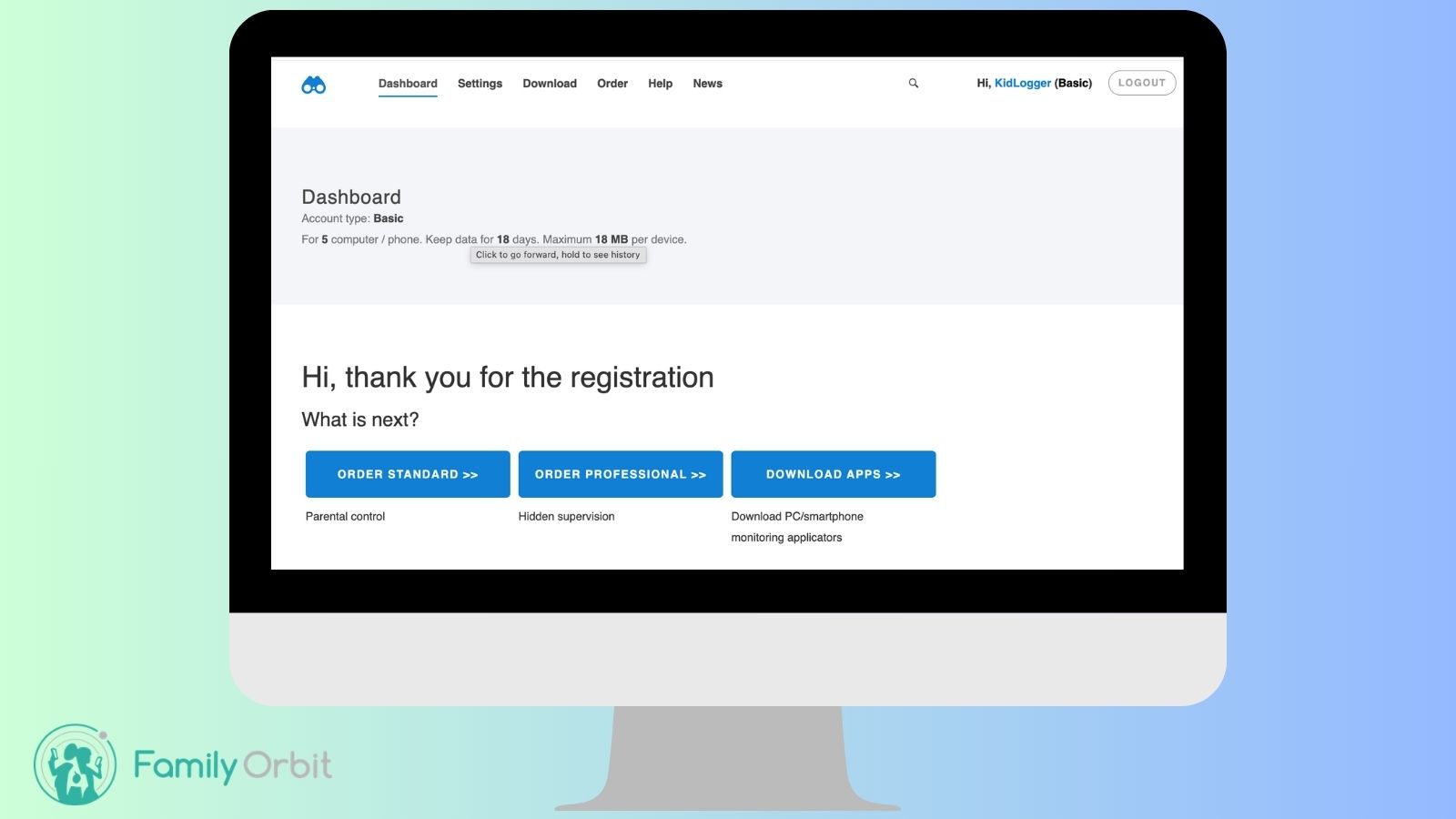
The basic process is straightforward in theory:
- Create a KidLogger online account.
- Add or connect a monitored device.
- Download the correct KidLogger agent for that device.
- Install it and grant the permissions required for the selected features.
- Choose what information should be collected.
- Review uploaded activity through the web dashboard.
The difficulty is in the details. Android monitoring apps require increasingly sensitive permissions, and some features may also require accessibility access, notification access, location permission, protection from battery optimisation or installation outside Google Play. Windows and macOS monitoring can similarly trigger antivirus or security warnings because the software records activity that security products associate with keyloggers or spyware.
KidLogger itself warns that antivirus software may detect the program because of its monitoring functions. That does not automatically mean the software is malicious, but it does mean parents should understand exactly what they are installing and why the operating system is objecting.
KidLogger on Android: What Parents Should Expect
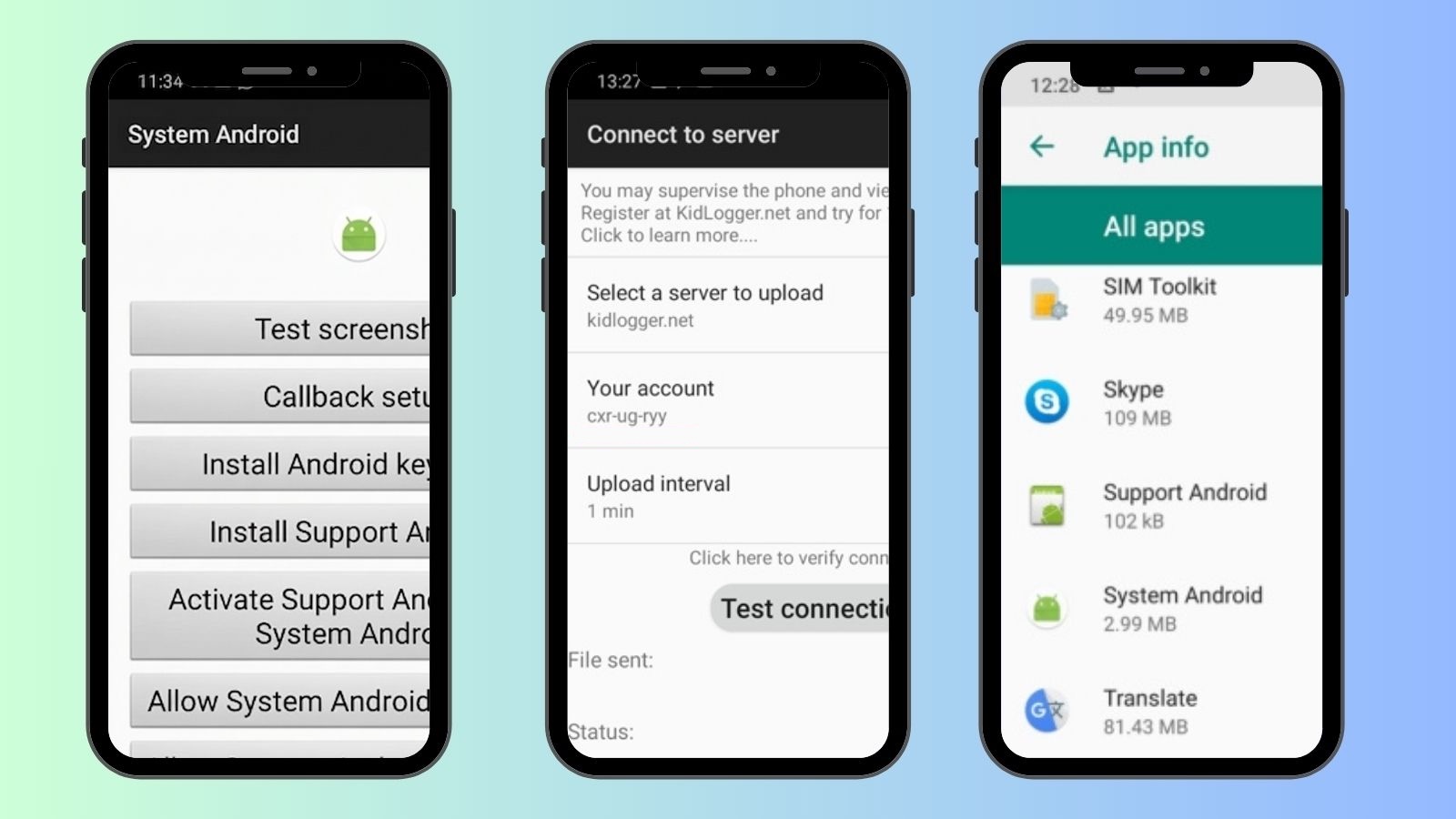
Android is the most important mobile platform for KidLogger. The current KidLogger 15 documentation describes a non-hidden parental-control version for newer Android devices. It can use a neutral icon and an alternative name, but the company says the application itself is not intended to be completely invisible in that version.
The current Android feature list includes application monitoring, GPS tracking, call and SMS logs, Chrome website history, incoming notification tracking, uninstall protection and the ability to protect access to Settings or Google Play with a PIN. Paid tiers add analytics, reports, more media access and selected control or recording functions.
Android setup may be more complicated than the pricing suggests
KidLogger is inexpensive, but it is not necessarily beginner-friendly. A parent may need to work through multiple installation guides because KidLogger offers different Android agents and documentation for different operating-system generations and feature levels. The setup may also vary by Samsung, Xiaomi, Oppo, Vivo and other manufacturers that aggressively stop background applications.
Before paying for Professional, confirm that your exact phone model, Android version and desired feature are supported. Call recording is a good example: KidLogger lists it for supported devices, but Android restrictions and manufacturer behaviour can make call audio unreliable or unavailable.
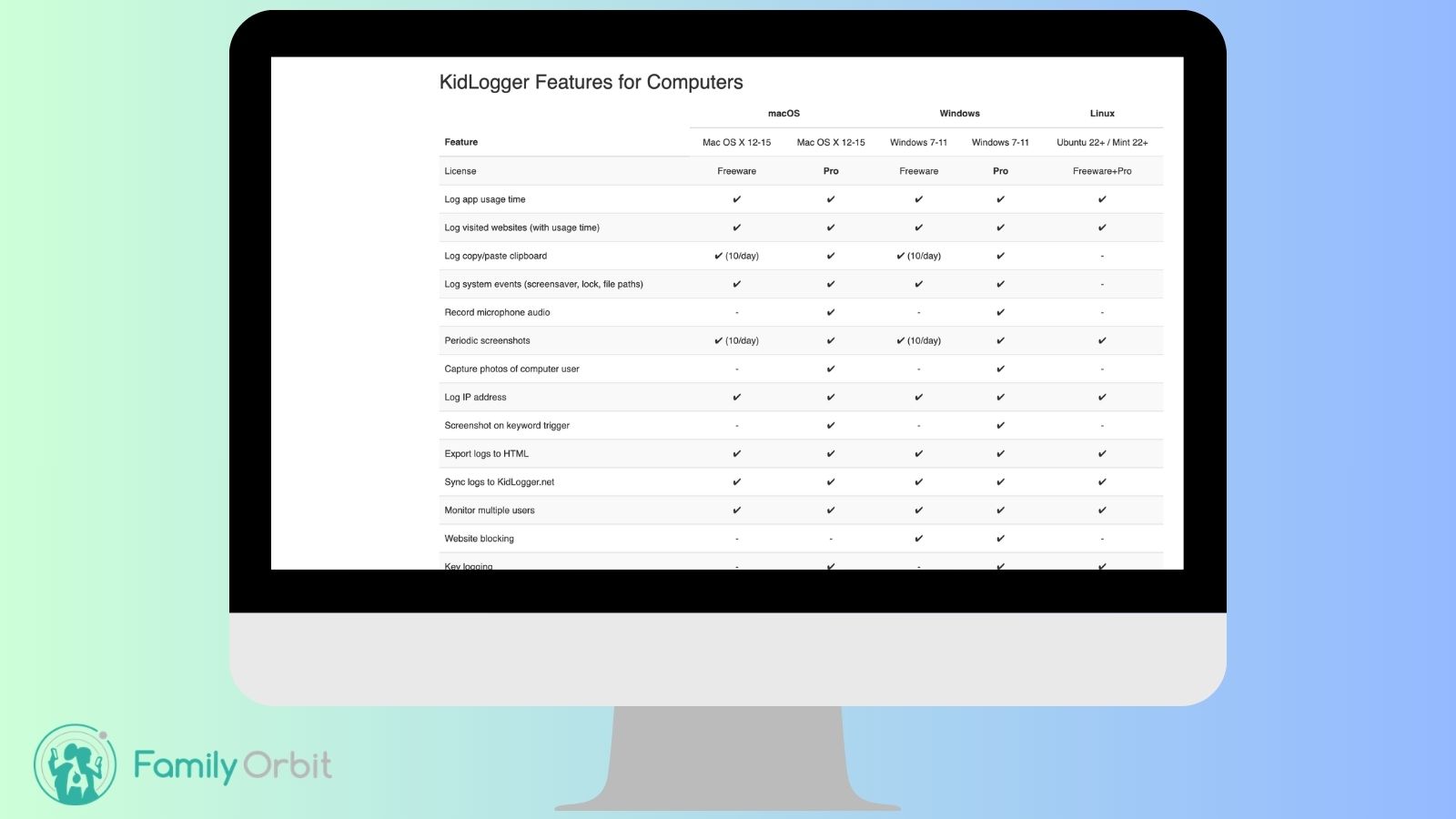
KidLogger on Windows, Mac and Linux
KidLogger is arguably more distinctive on computers than on phones. Many mainstream parental-control apps concentrate on web filtering and screen-time schedules. KidLogger can record a much more detailed chronological history of computer use.
- Applications opened and the time spent in them
- Visited websites and browser activity
- Periodic or keyword-triggered screenshots on supported plans
- Files and folders opened
- Connected USB drives and other storage devices
- Multiple local user accounts
- Keystrokes and clipboard text on supported Windows plans
- Audio recording on supported paid configurations
This can be useful when a parent is specifically worried about a shared family PC or a child’s laptop. It can also be excessive. Reviewing every application, screenshot and typed phrase is a very different parenting approach from receiving an alert about a dangerous search, an unknown contact or a missed school check-in.
Mac users should check compatibility carefully. KidLogger’s main page currently lists macOS 12–14, so support for newer macOS releases should not be assumed merely because the installer still downloads.
KidLogger Features: What You Actually Get
| Feature | Where It Is Available | Our Take |
|---|---|---|
| Application usage | Android, Windows and macOS | Useful for seeing what was opened and for how long, although detailed analytics are stronger on paid plans. |
| Website history | Platform and browser dependent | Helpful as a historical record, but it is not the same as intelligent real-time content filtering. |
| GPS location | Android | Can create location history and frequent coordinates, but KidLogger is not as family-location focused as dedicated locator apps. |
| Calls and SMS | Android | Potentially useful, but Android permissions and manufacturer restrictions can affect what is available. |
| Notifications and chats | Selected Android/desktop agents and plans | May reveal notification text or supported chat activity; do not assume complete message histories from every app. |
| Screenshots | Windows, macOS and selected configurations | Provides visual context but creates a large amount of sensitive data to secure and review. |
| Keystroke monitoring | Primarily Professional on Windows and selected agents | Extremely intrusive and capable of capturing private or financial information. It should never be enabled casually. |
| App blocking | Selected Android and Windows configurations | Useful, but less unified and straightforward than dedicated parental-control platforms. |
| Email reports | Standard and Professional | A practical way to avoid opening the dashboard constantly, although reports can still be data-heavy. |
| Audio/call recording | Professional on supported devices | High privacy and legal risk. Availability varies, and parents should not assume it will work on every phone. |
Location tracking
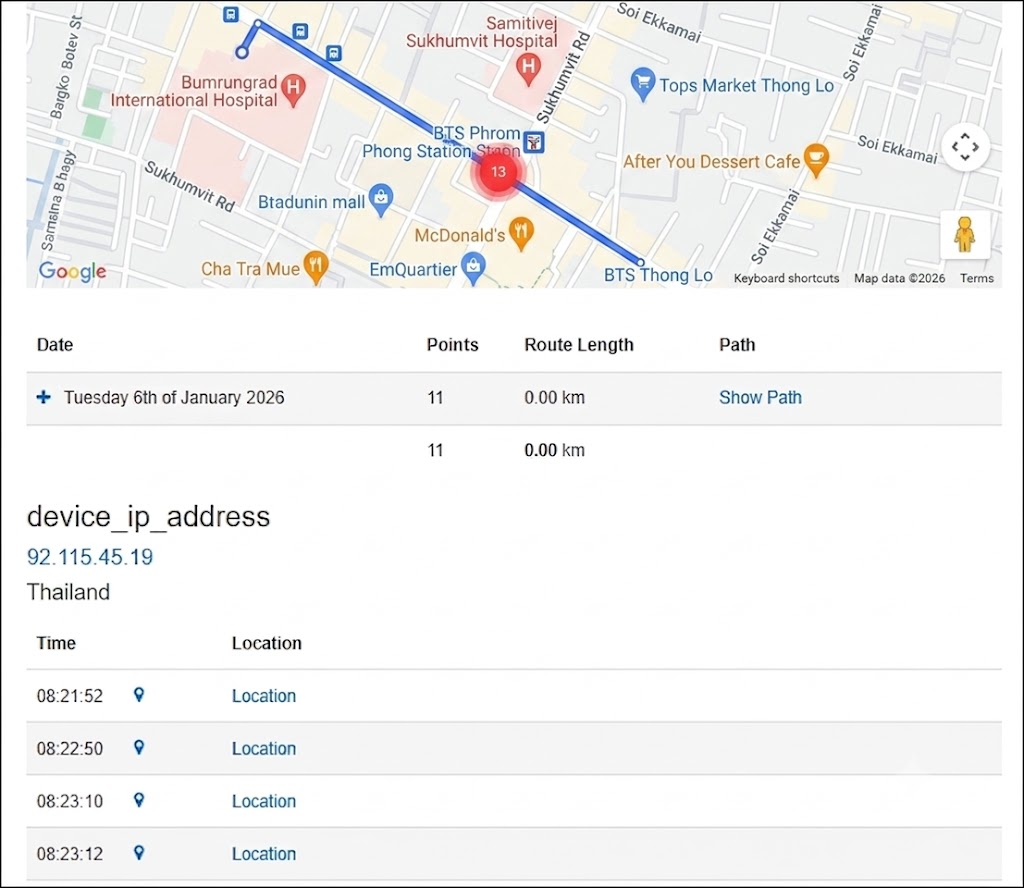
KidLogger can record Android GPS or Wi-Fi coordinates and display a history in the online account. Current Android documentation says the interval can be set as frequently as one minute. Professional features also include ways to request or share coordinates remotely in supported configurations.
That is useful for reconstructing where a phone has been. However, location history is not the same thing as a polished family locator. KidLogger does not prominently position geofenced arrival and departure alerts, family circles or check-in workflows as core strengths.
Calls, SMS and notification monitoring
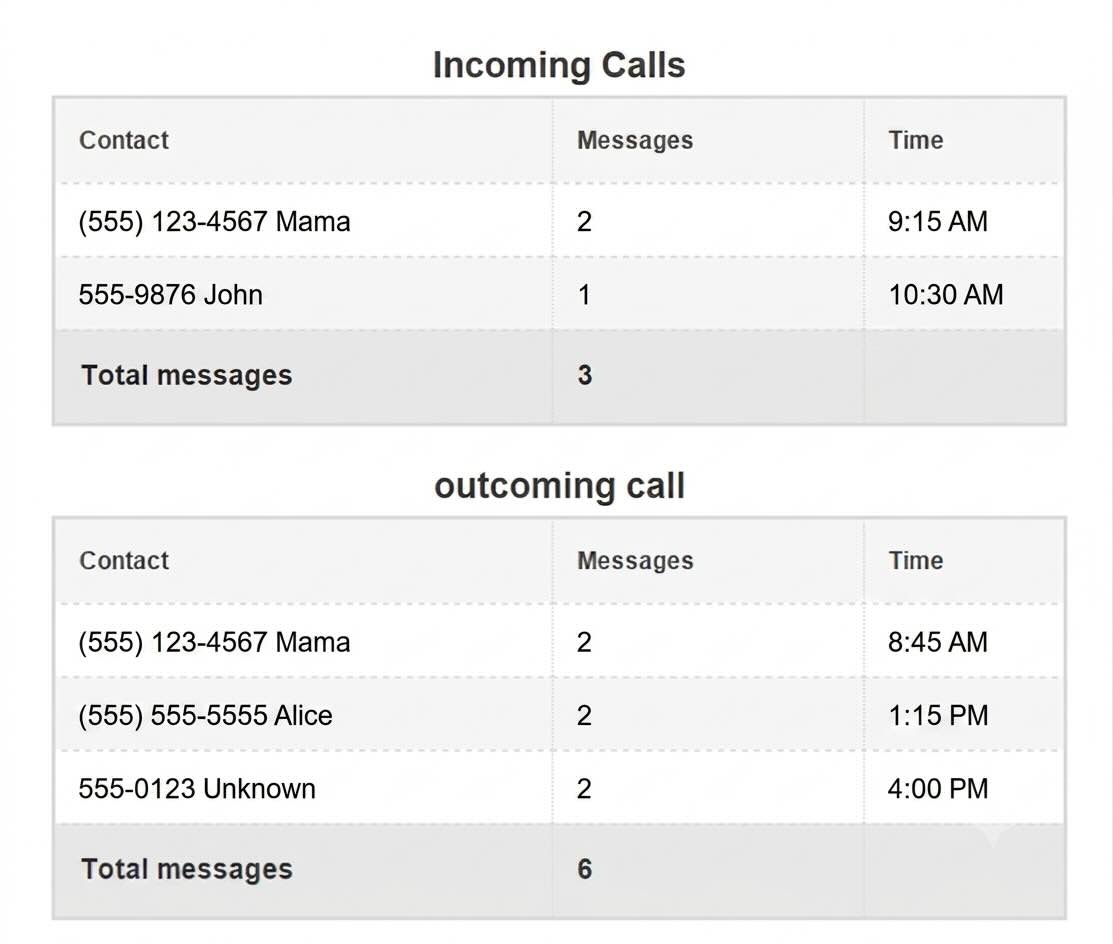
On Android, KidLogger advertises logs for incoming and outgoing calls, SMS messages and incoming app notifications. This may help parents spot unknown contacts or conversations that deserve discussion. It should not be interpreted as a promise to retrieve every message from WhatsApp, Snapchat, Instagram, Telegram or another encrypted service.
Notification monitoring can sometimes show the text that appears in a notification, but it may miss muted conversations, opened messages, disappearing content or notifications hidden by the app. Any review that claims complete access to every social platform should be treated cautiously.
Screenshots and keystrokes
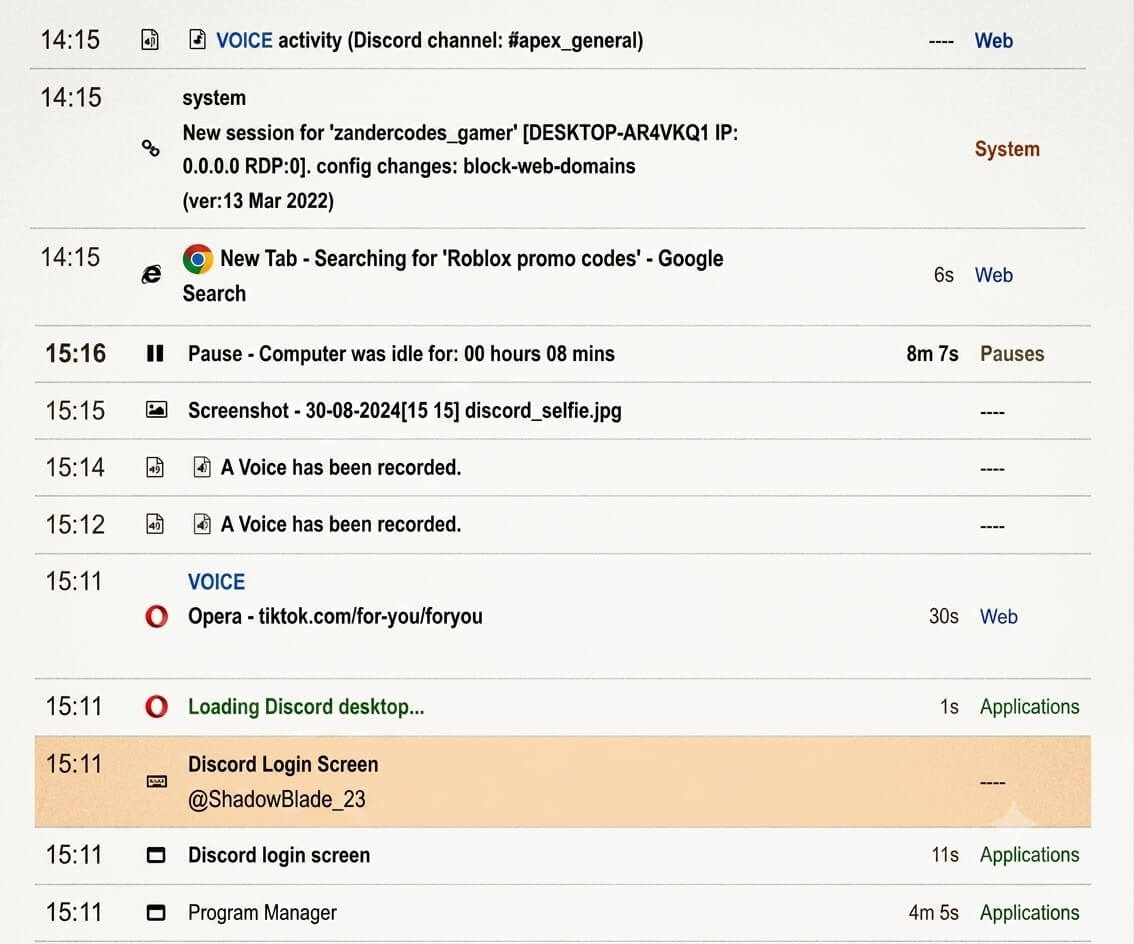
Screenshots and keystroke records are the features that make KidLogger unusually powerful—and unusually invasive. A screenshot can show context that a simple app-usage record cannot. A keystroke log can reveal searches, messages and document text. It can also capture account credentials, private conversations, medical information and payment details that a parent never intended to collect.
These functions should be enabled only when there is a clear, proportionate reason and the family understands the boundaries. Secretly recording an adult, partner, employee or someone else’s device can create serious legal and ethical problems.
KidLogger Dashboard and Usability
KidLogger provides a browser-based dashboard rather than making a polished parent phone app the centre of the experience. Its public demo shows chronological activity records with filters for applications, websites, messages, keystrokes, calls, media, files, coordinates and system events.
The benefit is depth: parents can search and filter a large amount of historical information. The drawback is cognitive overload. A chronological feed is useful for investigation, but it can force a parent to become a part-time analyst. The system is better at answering “What happened on this device?” than “What needs my attention right now?”
The interface also retains an older, technical feel. Parents who are comfortable working through help pages and adjusting device-specific settings may be fine. Someone expecting the simplicity of a mainstream family app may find it harder than necessary.
KidLogger Pricing in 2026
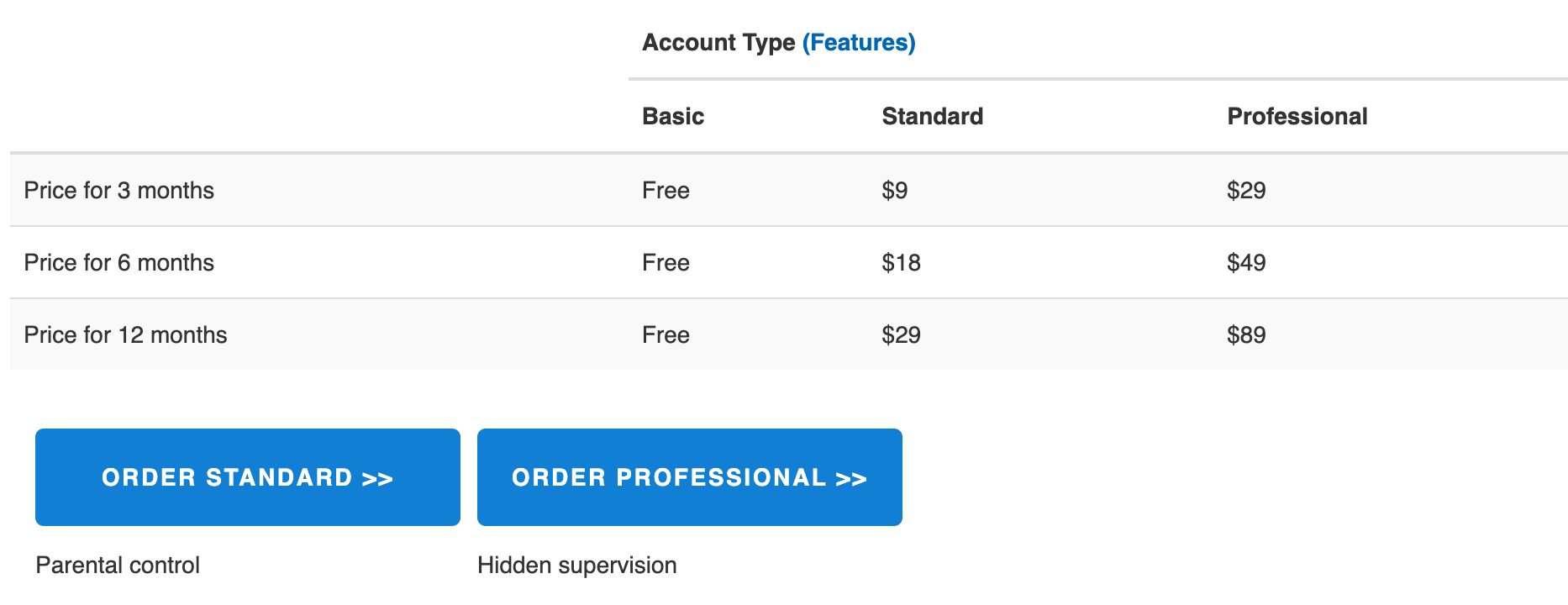
KidLogger is much cheaper than most commercial parental-monitoring products. The free plan is permanent rather than a short trial, and even the Professional plan costs less per year than many competitors charge for a few months.
| Plan | Current Price | Devices | History and Storage | Main Difference |
|---|---|---|---|---|
| Basic | Free | Up to 5 | 18 days; 18 MB per device | Core monitoring with limited storage, reports and advanced features |
| Standard | $9 / 3 months $17 / 6 months $29 / year |
Up to 5 | 60 days; 400 MB per device | Longer history, greater storage, reports, analytics and priority support |
| Professional | $29 / 3 months $49 / 6 months $89 / year |
Up to 10 | 90 days; 1,000 MB per device | Advanced recording, chat/media features and additional controls where supported |
Prices and plan limits were checked on July 29, 2026. KidLogger says paid orders can take up to 24 business hours to process. It also advertises a full refund within 10 days when the app is incompatible with the child’s device or declared features do not work. Always recheck the current checkout and refund terms before paying.
Is the Free KidLogger Plan Actually Useful?
Yes—but mainly as a way to understand the product and cover basic monitoring needs. The Basic plan supports up to five devices and keeps records for 18 days. That is unusually generous for a free account.
The main limitation is not simply the number of days. Free users receive much less storage and fewer advanced reports or recording functions. Screenshots may operate only in a limited demonstration mode on supported desktop platforms, while advanced chat, media, audio and control features are generally reserved for Professional.
The free plan makes the most sense when you want to:
- See whether your device is compatible
- Test whether logs upload reliably
- Monitor basic application and website usage
- Check Android call, SMS or location records where supported
- Decide whether the dashboard is manageable before paying
Do not upgrade merely because the feature table looks impressive. First confirm that the free agent stays connected, survives a restart and produces the specific records you need on your exact device.
KidLogger Privacy and Security
Privacy deserves more attention than it normally receives in monitoring-app reviews. KidLogger can collect some of the most sensitive data available on a device: locations, messages, screenshots, typed text, photos, audio and call information. Even when a parent has a legitimate reason to monitor a child’s device, that information needs strong protection.
KidLogger says device activity is transmitted to its service and stored as logs for access through the online account. Its privacy information says users can delete their profile and associated data. The service also offers optional end-to-end encryption for compatible agents and newer accounts. KidLogger describes that feature as experimental and says sensitive data is encrypted on the monitored device and decrypted in the account owner’s browser.
That is a positive direction, but parents should not assume every installed agent automatically uses end-to-end encryption. KidLogger’s own documentation notes that agents without encryption support may continue uploading information in the traditional way. Check the encryption status of every connected device rather than relying on a general website badge.
Practical security precautions
- Use a unique password that is not shared with the child’s device.
- Use an email address the child cannot access.
- Enable end-to-end encryption when the device agent supports it.
- Do not collect audio, screenshots or keystrokes unless genuinely necessary.
- Delete old devices and data that you no longer need.
- Review storage limits because older files may be removed automatically.
- Secure any downloaded backups as carefully as the online account.
KidLogger’s support page specifically warns parents not to register with an email address used on the monitored device, because support messages may then be visible to the child. That warning also illustrates how technical details can undermine a supposedly discreet setup.
Is KidLogger Safe?
KidLogger appears to be a real, long-running monitoring product rather than a fake checkout page. It publishes feature documentation, support material, terms, a public dashboard demo and privacy information. It also provides a free plan, so parents can test basic compatibility before buying.
However, “safe” has two meanings here. The first is whether the software itself is legitimate. The second is whether it is safe to collect this amount of personal data. Features such as keylogging, screenshots, microphone recording and call recording can create risk even when the software functions exactly as advertised.
Our view is that KidLogger can be used responsibly on a device a parent owns and manages, but its most invasive features should not be treated as normal defaults. Transparent family rules are safer than trying to turn routine parenting into covert surveillance.
Is KidLogger Legal?
KidLogger is not automatically legal simply because it is available for download. Monitoring laws vary by country and state, and the rules can differ depending on who owns the device, the child’s age, what information is recorded and whether another person’s calls or messages are captured.
KidLogger’s own terms place responsibility on the user to monitor equipment they own or are authorised to manage and to comply with applicable privacy law. In some situations, consent or written permission may be required.
This article provides general product information, not legal advice. Check the law in your location before recording calls, audio, private messages or keystrokes.
Where KidLogger Falls Short as a Parental-Control App
KidLogger’s core weakness is not a lack of data. It may actually collect too much of the wrong kind of data for an average family.
1. It is better at recording than explaining
A chronological log can show that an application opened, a website loaded or a phrase was typed. It does not necessarily tell a parent whether the event was dangerous, harmless, sarcastic, quoted from homework or part of a conversation that has already been resolved.
2. iPhone support is a deal-breaker
KidLogger’s current supported-platform list centres on Android and computers. Families with iPhones should choose a product designed for Apple’s restrictions rather than hoping a computer-focused logger will somehow provide equivalent mobile monitoring.
3. Setup and documentation are fragmented
KidLogger has a large number of help pages, versions, agents and plan-specific capabilities. That is better than having no documentation, but it also makes the product harder to understand. Some pages describe a transparent non-hidden Android philosophy, while other plan tables and newer announcements refer to hidden versions or stealth features. Parents should verify which installer and behaviour they are actually choosing.
4. Its most powerful features create the biggest privacy risk
Keystrokes, screenshots and audio can reveal far more than a parent intended to collect. A safer product design would prioritise meaningful child-safety events and minimise unnecessary data rather than making maximum recording the main selling point.
KidLogger vs Family Orbit
KidLogger and Family Orbit overlap, but they are not built around the same philosophy. KidLogger is strongest when a technically confident user wants detailed Android or computer activity logs at a very low price. Family Orbit is built more directly around parents who want mobile family safety, location and understandable monitoring across Android and iPhone.
| Area | KidLogger | Family Orbit |
|---|---|---|
| Main focus | Detailed device activity logging | Mobile family safety and parental monitoring |
| Android | Strong but setup can be technical | Dedicated child monitoring experience |
| iPhone | Not meaningfully supported in the current platform list | Designed to support family monitoring on iPhone |
| Windows/Mac logging | Major strength | Not the primary product focus |
| Location | Android coordinate history | Family-oriented location and geofence tools |
| Parent access | Primarily web dashboard | Parent apps plus online account |
| Free access | Permanent Basic plan | Trial-based access |
| Best for | Technical users who want raw logs and computer monitoring | Parents wanting a clearer mobile family-safety experience |
Choose KidLogger when desktop activity monitoring matters, cost is the main constraint and you are comfortable configuring technical monitoring agents.
Choose Family Orbit when your priority is monitoring a child’s phone, supporting both Android and iPhone, tracking family location and getting help with setup without turning the process into a technical project.
Looking for a simpler phone-monitoring experience?
Family Orbit is designed around parents who want mobile monitoring, location and direct support across the devices their children actually use.
Explore Family OrbitWho Should Use KidLogger?
KidLogger may be a reasonable choice for:
- Parents who need monitoring on a Windows family computer
- Android-only households willing to work through device permissions
- Users who want to try a permanent free plan
- Technically confident parents who prefer raw historical records
- Families that need several monitored devices on a tight budget
KidLogger is probably the wrong choice for:
- iPhone-only or mixed Android/iPhone families
- Parents who want a polished mobile parent app
- Families primarily seeking geofences, check-ins and immediate safety alerts
- People who are uncomfortable managing APKs, permissions and antivirus warnings
- Anyone intending to monitor another adult or a device without permission
KidLogger Alternatives
The right alternative depends on what you actually need:
- Family Orbit: Better suited to parents who want mobile family monitoring, location tools and support across Android and iPhone.
- Google Family Link: A practical free option for Android app approvals, screen time and basic location without deep message or keystroke monitoring.
- Apple Screen Time and Family Sharing: The sensible starting point for iPhone families that primarily need limits, app controls and shared location.
- A dedicated desktop monitoring tool: Consider this category only when Windows or Mac activity—not phone safety—is the real requirement.
For a broader comparison, see our guide to the best parental monitoring apps.
Frequently Asked Questions About KidLogger
Is KidLogger free?
Yes. KidLogger has a permanent Basic plan that currently supports up to five devices, 18 days of history and 18 MB of storage per device. Paid plans increase storage, history, reports and advanced monitoring features.
Is KidLogger legitimate?
KidLogger is a real monitoring service with published software, documentation, support pages, privacy information and paid subscription plans. Whether it is appropriate for your family depends on the device, the features you enable and whether you use it transparently and legally.
Does KidLogger work on iPhone?
KidLogger’s current main compatibility list does not include iOS as a supported monitoring platform. Parents should not expect the Android or computer feature set on an iPhone. Choose an iPhone-focused parental-control product instead.
Can KidLogger see WhatsApp messages?
KidLogger advertises chat or notification monitoring in selected Professional configurations. That does not guarantee a complete WhatsApp history on every device. Results can depend on the operating system, agent, notification settings and permissions.
Does KidLogger record keystrokes?
Keystroke monitoring is available in selected paid computer agents, especially the Professional Windows configuration. This is a highly intrusive feature that can capture passwords and other private information, so it should be used only when necessary and lawful.
Can KidLogger record calls?
The Professional plan advertises call recording on supported Android devices. Compatibility can vary because newer Android versions and individual phone manufacturers restrict call audio. Call recording is also regulated in many jurisdictions.
Can a child detect KidLogger?
That depends on the installed agent and device. Current KidLogger 15 documentation describes a non-hidden Android version with a neutral icon and alternative name, while other product pages refer to hidden or stealth features in selected Professional configurations. We recommend transparent parental-control use rather than trying to conceal monitoring from a child.
Does KidLogger continue working after a restart?
KidLogger’s current plan comparison lists automatic startup after reboot. In practice, Android battery management, manufacturer restrictions, antivirus tools and removed permissions can still interrupt background monitoring. Test the agent after restarting the device.
Does KidLogger offer refunds?
KidLogger currently states that it offers a full refund within 10 days after payment when the app is incompatible with the child’s device or advertised features do not work. Read the current conditions before purchasing and document any compatibility problem promptly.
What is the best KidLogger alternative?
For phone-focused family monitoring across Android and iPhone, Family Orbit is a more direct alternative. For basic free restrictions, Google Family Link and Apple Screen Time may be sufficient. The best choice depends on whether you need mobile safety, computer activity logging or simple screen-time limits.
Final Verdict: Is KidLogger Worth It?
KidLogger is one of the best-value options for parents who specifically want detailed Android or computer activity records. The free plan is genuinely useful for testing, the paid subscriptions are inexpensive, and the product can collect a depth of information that many mainstream parental-control apps avoid.
But that depth is also the problem. KidLogger can turn parenting into a search through screenshots, keystrokes, calls, coordinates and chronological logs. Its setup and documentation are more technical than average, the interface feels dated, and the lack of meaningful iPhone support makes it unsuitable for a large part of the market.
Our conclusion: Use KidLogger when desktop monitoring, low cost and raw historical data are your main priorities. Choose a more family-focused product when you need Android and iPhone support, location alerts, easier setup and information that helps you respond without reading every action a child takes.
Need parental monitoring built around phones, not raw logs?
Family Orbit helps parents monitor their children’s mobile devices, location and digital activity with dedicated family-focused tools and direct setup support.
Try Family Orbit