MoniMaster promises an unusually broad view into another phone. Its flagship product, MoniMaster Pro, advertises access to calls, text messages, social apps, location, screenshots, browsing history, stored media, ambient sound, keystrokes and remote-control tools from an online dashboard.
For a worried parent, that can sound like an all-in-one solution. But MoniMaster is no longer a single, simple parental-control app. The company now sells a collection of overlapping products for Android, iPhone, iCloud, WhatsApp, Facebook, computer monitoring and online-status tracking. That creates an immediate practical question: what exactly are you buying, which device method does it use, and will the advertised features work on your particular phone?
This MoniMaster review focuses on MoniMaster Pro, the company’s main phone-monitoring product. We examine its current feature claims, Android and iPhone setup, pricing, automatic renewal, refund restrictions, privacy implications and whether it makes more sense than a family-focused parental-control service.
How this review was prepared: We checked MoniMaster’s current MoniMaster Pro product page, pricing page, purchase FAQs, refund policy, privacy policy, product store, compatibility statements and public demo material on July 31, 2026. The tests were performed on a Samsung A54 Android 15 phone, and an iPhone 17 Pro Max iOS 16. Our team has taken liberty to remove any identifying information from the screenshots and records.
MoniMaster Review: Quick Verdict
🔍 Our Quick Verdict on MoniMaster Pro
MoniMaster Pro has one of the broadest advertised feature lists in the phone-monitoring market. It combines communications, social-app activity, GPS, geofences, screenshots, keylogging, ambient recording and selected remote controls in one dashboard. The problem is that the marketing often makes complex, platform-dependent monitoring sound universal and effortless. Android normally requires physical access and extensive permissions, while iPhone monitoring can involve a different and more limited method. Its “30-day money-back guarantee” is also conditional rather than a no-questions-asked refund.
✅ Pros
- Very broad advertised Android feature set
- Calls, SMS, social apps, GPS and media in one dashboard
- Geofences, keyword alerts and screen-time controls are advertised
- Public online demo available before purchase
- Monthly, quarterly and annual subscription options
- Supports multiple devices when additional licences are purchased
❌ Cons
- No genuine free trial at the time of review
- Subscriptions renew automatically unless cancelled
- Refund policy contains significant exclusions
- Features differ substantially between Android, iPhone and iCloud
- “Undetectable” positioning raises consent and trust concerns
- Many overlapping MoniMaster products can confuse buyers
Best for: A technically confident parent managing an Android device who genuinely needs detailed activity records and is prepared to complete a more intrusive installation.
Skip it when: You mainly want simple family location, transparent child-safety tools, a low-friction installation or a forgiving refund process.
What Is MoniMaster?
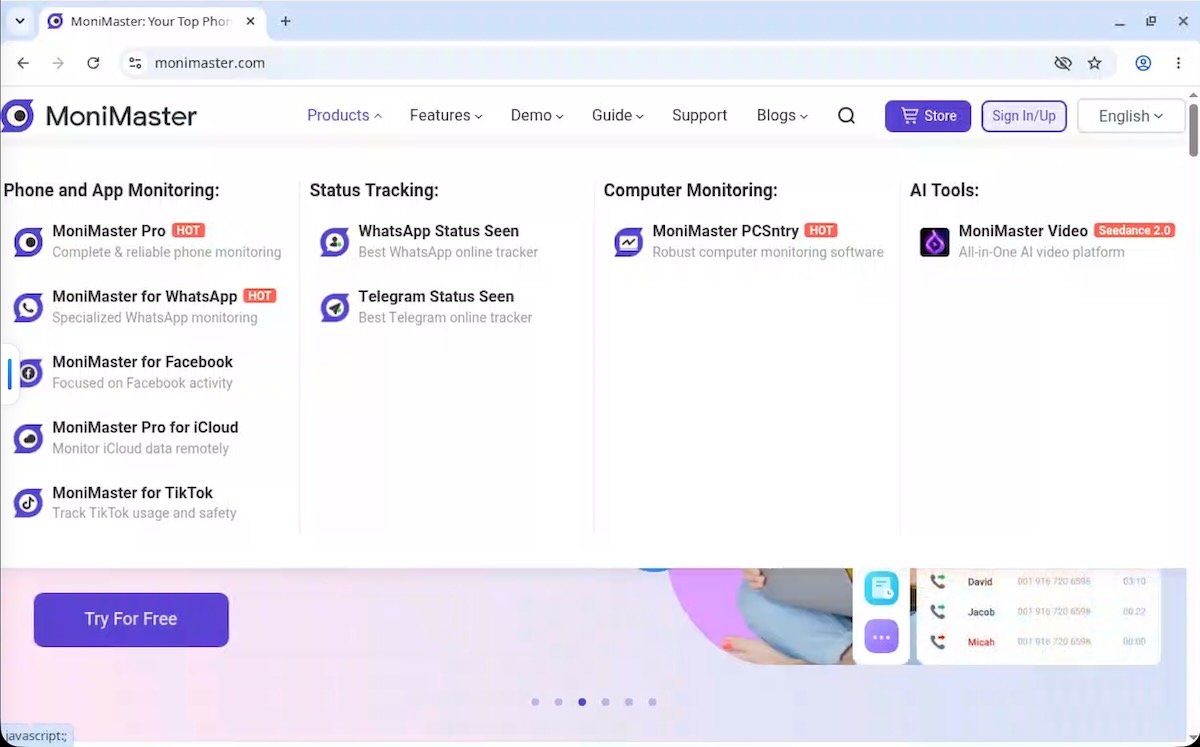
MoniMaster is a brand of phone and computer monitoring products. Its flagship service is MoniMaster Pro, which the company presents as an all-in-one monitoring tool for Android phones, iPhones and iCloud data. MoniMaster also sells separate products for WhatsApp, Facebook, Instagram, Telegram online status, WhatsApp online status, Windows computers and other narrower use cases.
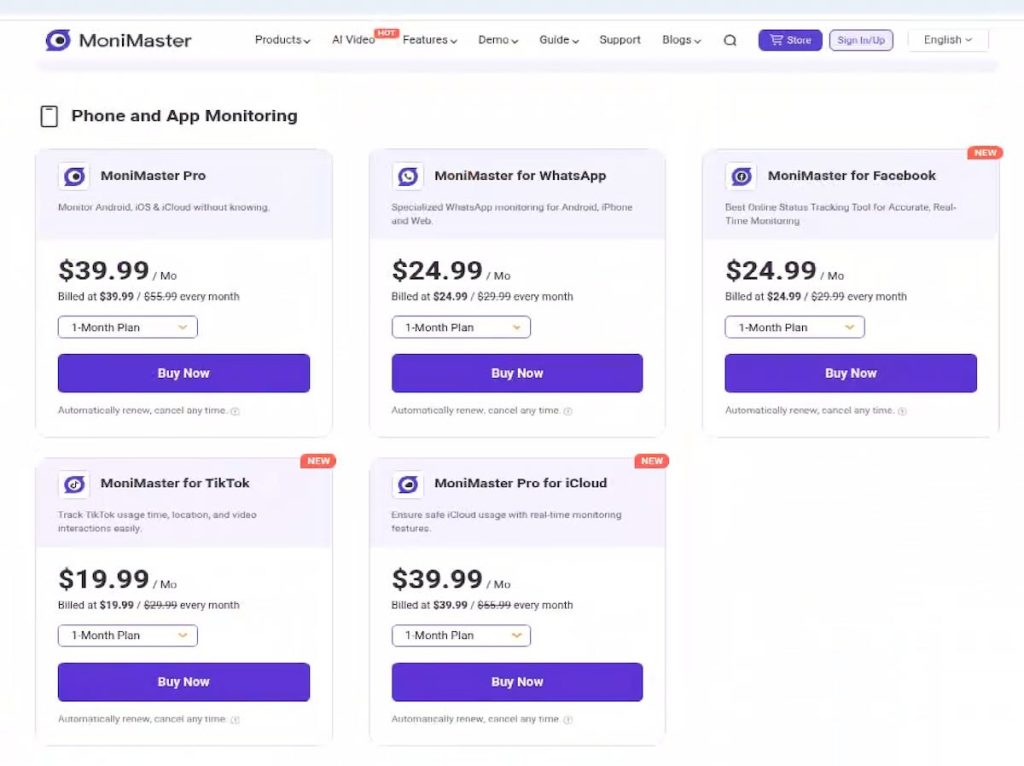
That distinction matters because a person searching for “MoniMaster” may land on several different checkout pages. A licence for one product should not automatically be assumed to unlock every other MoniMaster product. Before paying, confirm the exact product name shown in the basket, the number of devices covered, the supported operating system and whether the feature you need belongs to MoniMaster Pro or to a separately sold tool.
“MoniMaster” is the brand. “MoniMaster Pro” is the main phone-monitoring product. MoniMaster for WhatsApp, MoniMaster for Facebook, MoniMaster iCloud monitoring and PCSntry are separate or specialised offerings. Read the checkout description rather than assuming one subscription covers the entire catalogue.
What Does MoniMaster Pro Claim to Monitor?
MoniMaster Pro advertises more than 50 monitoring and control features, although the exact list depends on the target device and setup method. Its current marketing includes:
- Incoming, outgoing, missed and deleted call records
- Sent, received and deleted SMS messages
- Contacts and calendar information
- Current location, location history and geofences
- Photos, videos and other stored media
- Browsing history and bookmarks
- Application use and installed apps
- WhatsApp, Facebook, Instagram, Snapchat, Telegram and other social-app activity
- Keystrokes entered in supported applications
- Manual and automatic screenshots
- Screen recording and live-screen features
- Ambient sound recording and remote camera access
- Keyword alerts
- App and website blocking
- Screen-time limits
This is the advertised feature set—not a guarantee that every feature works on every device. Android version, phone manufacturer, permissions, battery management, app updates and the chosen MoniMaster product can all change what appears in the dashboard.
| Feature area | Advertised capability | What must be verified |
|---|---|---|
| Calls and SMS | View records and message content | Whether deleted or pre-installation data appears |
| Social apps | Monitor 20+ apps | Exact apps, message direction, media and update reliability |
| Location | Live GPS, history and geofences | Accuracy, update interval and background reliability |
| Screenshots | Manual and 15-minute automatic captures | Whether current Android restrictions interrupt capture |
| Keylogger | Record typed text in supported apps | Accessibility requirements and app coverage |
| Ambient recording | Record phone surroundings remotely | Permission, notification, duration and legal constraints |
| Remote controls | Block apps/sites, set time limits and capture the screen | Which controls are available on Android versus iPhone |
How Does MoniMaster Work?
The setup depends on whether the monitored phone is Android or iPhone. MoniMaster’s marketing often groups the platforms together, but the underlying access methods are not equivalent.
How MoniMaster works on Android
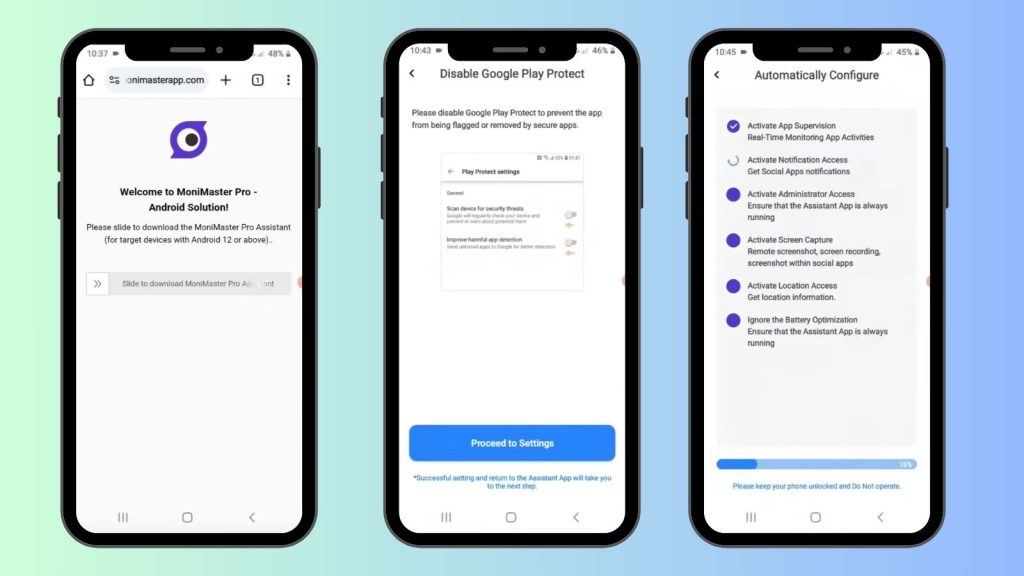
Android monitoring generally requires physical access to the phone. The parent creates an account, purchases a licence, downloads the MoniMaster Android package, installs it on the target phone and grants the requested permissions. Depending on the selected features, those permissions may include location, notifications, accessibility, device administration, storage, microphone, camera and permission to run continuously in the background.
MoniMaster currently says its Android product supports Android 6 through Android 15. Another current purchase FAQ still refers to Android 6 through Android 14, which shows why compatibility should be confirmed immediately before purchase. The company also states that rooting is not required for its standard setup.
Once installed, collected information is uploaded over Wi-Fi or mobile data and displayed in the MoniMaster web panel. The company promotes the Android app as hidden or “undetectable” after installation. Parents should not treat invisibility as an automatic benefit. Secret monitoring can undermine trust, may violate local law and can create serious privacy risks when screenshots, audio or typed passwords are collected.
How MoniMaster works on iPhone
iPhone monitoring is more complicated because iOS does not allow an ordinary third-party app to silently collect every message, keystroke and screenshot in the same way as a heavily permissioned Android app. MoniMaster promotes support for iPhones and iCloud, but buyers must identify the exact method offered for their device.
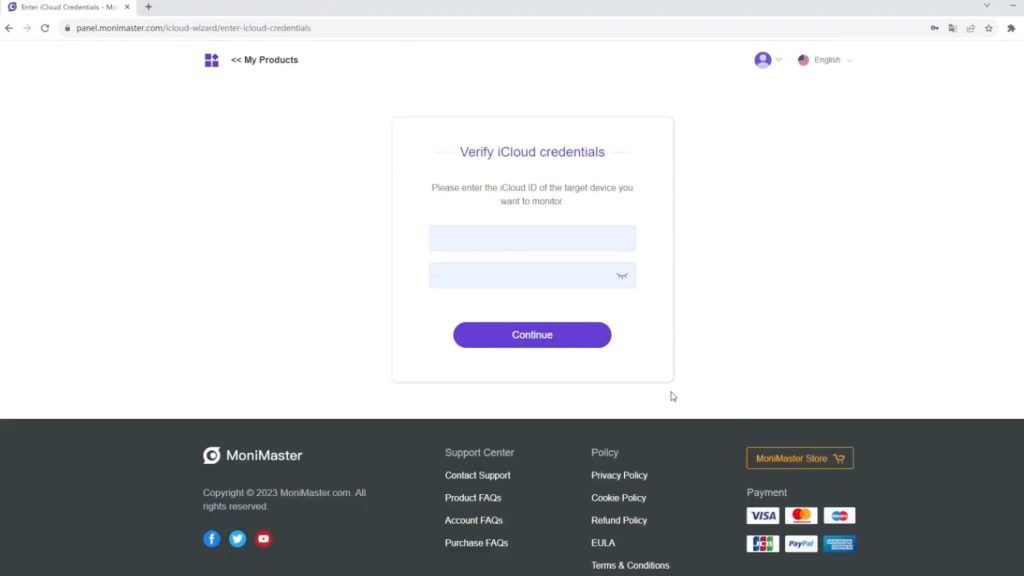
Depending on the product and setup, iPhone access may rely on iCloud credentials and two-factor authentication, data already synchronised to iCloud, or a computer-based viewer or backup process. These methods can reveal selected data but should not be assumed to provide Android-style live access to every social app or remote-control feature.
MoniMaster’s purchase FAQ currently states support for iOS 9 through iOS 18, while the main product page says it supports all iOS devices and versions. Those broad statements should be treated as compatibility claims, not proof that every feature works on every iPhone. Before buying, ask support to confirm the exact feature and method for your iPhone model, iOS version, iCloud configuration and two-factor authentication status.
A claim that a product “supports iPhone” does not mean it can deliver every Android feature on iOS. Confirm whether you are buying live device monitoring, iCloud data access, a computer backup viewer or a separate product. These methods are not interchangeable.
MoniMaster Dashboard and Ease of Use
MoniMaster provides a browser-based dashboard, which means the parent can review collected data from another phone or computer without repeatedly handling the monitored device. The company also offers a public demo, allowing buyers to inspect the general layout before paying.
The dashboard’s usefulness depends on more than the number of menu items. A parental-control dashboard should help a parent identify what matters, not merely present an enormous chronological archive. During testing, pay attention to:
- Whether important alerts are separated from ordinary activity
- Whether timestamps use the correct timezone
- How easy it is to switch between devices
- Whether social-app data is organised by contact and conversation
- Whether maps show meaningful location history rather than isolated points
- How quickly screenshots, audio and media load
- Whether data can be deleted or exported
- Whether the parent can control retention and account security
A wide feature list can become a liability when the interface makes parents manually inspect every screenshot, keystroke and notification. The best safety tool is not necessarily the one collecting the most data; it is the one that helps the parent notice and respond to the right events.
Feature-by-Feature Assessment
Calls and text messages
MoniMaster advertises incoming, outgoing and missed call details together with sent and received SMS messages. This is a standard Android monitoring feature when the app has the required permissions. The stronger claims—such as deleted content or information created before installation—need careful verification. MoniMaster’s refund policy specifically warns that a user may not receive data saved before the software was installed.
MoniMaster Pro advertises monitoring for more than 20 social apps, including WhatsApp, Facebook and Instagram. On Android, this type of monitoring may rely on notification access, accessibility services, screen capture or other device-level permissions. Coverage can break when the monitored app changes its interface or Android changes its security rules.
Do not assume that “monitor WhatsApp” always means a perfect copy of every chat, call, deleted message, disappearing message and attachment. A proper test should check incoming and outgoing messages, group chats, voice notes, calls, media, deleted content and messages received while the phone is offline.
GPS tracking and geofences
MoniMaster promotes current GPS location, historical routes and geofence alerts. These are genuinely useful parental-control features, but accuracy depends on the monitored phone’s location settings, network connection and permission to run in the background. During testing, compare MoniMaster’s reported position against the phone’s actual position at home, outdoors and while travelling.
Screenshots and live-screen tools
The product page advertises manual screenshots and automatic screenshots every 15 minutes. Screenshots can show activity that notification-based monitoring misses, but they also collect highly sensitive information. A screenshot may expose passwords, banking details, private photographs, health information or conversations belonging to people who never consented to monitoring.
Keylogger and keyword alerts
MoniMaster says it can record keystrokes and alert the parent when selected words or phrases appear. Keyword alerts can be useful when they are targeted at credible safety concerns, but keylogging is one of the most intrusive features in the product. Parents should avoid collecting account passwords or unrelated private communication and should explain age-appropriate monitoring boundaries to the child.
Ambient sound, camera and call recording
MoniMaster advertises remote ambient recording, camera capture and call recording on supported devices. These features are technically and legally sensitive. Recording a room or telephone conversation without the knowledge of people present may violate local consent laws. Availability also varies by Android version and phone manufacturer. Treat these tools as features requiring direct confirmation—not as guaranteed capabilities.
App blocking, website blocking and screen-time limits
These controls move MoniMaster closer to a conventional parental-control app. They are often more useful than raw surveillance because they allow a parent to act. During testing, verify whether blocks take effect immediately, survive a reboot, work across browsers and can be bypassed by disabling permissions or using another user profile.
MoniMaster Pricing
At the time of this review, MoniMaster Pro displayed three promotional subscription options. Prices and discounts can change, so confirm the checkout total before paying.
| Plan | Promotional price shown | Renewal | Important note |
|---|---|---|---|
| 1 month | $39.99 | Renews monthly | Highest effective monthly cost |
| 1 quarter | $59.99 | Renews quarterly | Paid upfront for the full quarter |
| 1 year | $109.99 | Renews annually | Lowest advertised daily cost |
The pricing page says subscriptions renew automatically and can be cancelled from the product settings or cancellation page. The purchase FAQ says additional licences are required for additional devices, although MoniMaster Pro may offer multi-device plan options or promotional bundles. Do not assume the headline price covers every phone in the family.
MoniMaster does not currently offer a normal free trial. It provides a free online demo, and its purchase FAQ says a free trial is planned for the future. A demo is useful for checking the interface but cannot prove that installation, data collection and background reliability will work on your phone.
Is MoniMaster’s 30-Day Money-Back Guarantee Really Risk-Free?
No—the guarantee is conditional. MoniMaster’s sales page prominently advertises a 30-day money-back guarantee, but its formal refund policy says a customer may be considered for a refund when a technical issue cannot be adequately resolved by support and the request meets the policy’s conditions.
The policy lists several situations that may not qualify, including:
- Requests submitted more than 30 days after purchase
- Failure to reinstall or relink after an operating-system update
- Buying for a device considered incompatible under the compatibility policy
- Refusing troubleshooting or failing to follow setup instructions
- Expecting historical data that existed before MoniMaster was installed
- Wanting to monitor more devices than the purchased licence allows
- Problems caused by circumstances outside MoniMaster’s control
That does not mean refunds are impossible. It means the phrase “30-day money-back guarantee” should not be interpreted as “change your mind for any reason and receive an automatic refund.” Contact support quickly, cooperate with troubleshooting and keep screenshots of the issue, order details and support correspondence.
Read the formal refund policy, not only the guarantee badge. Confirm compatibility in writing when a specific feature is essential, and cancel automatic renewal as soon as you decide not to continue.
Is MoniMaster Safe?
MoniMaster is a real commercial service with a functioning website, checkout, support channels and published policies. That answers whether it exists; it does not answer every security or privacy question.
The service is designed to collect exceptionally sensitive target-device data. Depending on the enabled features, that may include location, messages, contacts, photos, screenshots, browser activity, keystrokes, microphone recordings and camera images. Anyone using the account could potentially see a detailed record of the monitored person’s private life.
MoniMaster’s privacy policy says it collects account, device, usage and location-related information and may use server providers, email-delivery services and third-party analytics. It also states that measures are used to protect target-device data and restrict employee access. As with any cloud monitoring service, parents still need to consider what is uploaded, how long it remains available, who controls the account and what happens if credentials are compromised.
Practical safety steps
- Use a unique, strong password for the MoniMaster account.
- Enable any available account-security or two-factor-authentication options.
- Do not reuse the monitored child’s Apple, Google or email password elsewhere.
- Limit enabled features to those genuinely required for safety.
- Delete old logs when they are no longer needed.
- Do not share dashboard access with people who do not need it.
- Remove the monitoring app and revoke permissions when monitoring ends.
The safest parental-control setup is usually the least intrusive setup that solves the actual problem. Tracking school arrival may justify location access; it does not automatically justify recording every nearby conversation or capturing every typed password.
Is MoniMaster Legit?
MoniMaster is legitimate in the narrow sense that it is an active commercial software brand, sells working subscriptions and publishes product, support, privacy and refund information. The more useful question is whether it will deliver the specific result a buyer expects.
The answer depends heavily on the platform. Detailed Android monitoring is technically more plausible when the app is physically installed and given extensive permissions. Broad iPhone claims require more caution because iCloud, backup and viewer methods cannot simply reproduce every Android function. “Legit” therefore should not be confused with “every marketing claim will work on every device.”
Public review platforms currently show many positive comments about support, but review sites do not independently verify every product-performance claim. Use customer reviews as one signal, not as a substitute for compatibility confirmation and a controlled test on your own device.
Can MoniMaster Be Used Without the Other Person Knowing?
MoniMaster advertises hidden or undetectable monitoring on supported Android configurations. Technically, the app icon may be concealed after installation, but complete invisibility should never be assumed. Android may display security, accessibility, battery, privacy or microphone indicators. A technically aware user may also find the app in settings, permissions, device administration, network usage or battery records.
More importantly, secret monitoring is not automatically lawful or appropriate. Monitoring a partner, adult family member, employee or device you do not own can violate privacy, interception and computer-access laws. Even when a parent owns a child’s device, age-appropriate transparency is usually healthier than creating a permanent atmosphere of secret surveillance.
Use restriction: Install monitoring software only on a device you own or are legally authorised to manage. Do not use it to secretly monitor a spouse, partner, employee, tenant or another adult. Laws differ by country and state, especially for audio and call recording.
MoniMaster Pro vs Family Orbit
MoniMaster Pro and Family Orbit overlap, but they are positioned differently. MoniMaster emphasises maximum visibility and covert monitoring. Family Orbit is designed more directly around parental monitoring, family location and practical safety tools.
| Area | MoniMaster Pro | Family Orbit |
|---|---|---|
| Main approach | Broad, surveillance-style device monitoring | Parental monitoring and family safety |
| Android | Extensive installed-app monitoring | Dedicated child app and parent-focused setup |
| iPhone | iPhone/iCloud methods vary by product and setup | Multiple supported parental-monitoring methods |
| Location and geofences | Advertised | Core family-safety features |
| Keylogging and ambient recording | Major advertised features | Not the central product proposition |
| Parent mobile app | Primarily online dashboard; confirm current apps | Parent apps for iOS and Android |
| Device allowance | Additional licences or multi-device plan required | Family-oriented device allowance by plan |
| Trial | Demo, but no normal free trial at review time | Trial option available |
| Best suited to | Users wanting maximum Android activity visibility | Parents wanting a clearer family-safety product |
Choose MoniMaster Pro when:
- You need a specific advanced Android monitoring feature.
- You are comfortable installing outside the Play Store and managing sensitive permissions.
- You understand that availability varies by phone and operating system.
- You are prepared to review detailed logs and manage strict privacy boundaries.
Choose Family Orbit when:
- The primary goal is child safety rather than maximum covert visibility.
- You need a parent-facing mobile app and family-oriented onboarding.
- Location, geofences, alerts and multi-device family use matter most.
- You want to test the service before making a longer commitment.
Who Should Use MoniMaster?
MoniMaster may suit:
- Parents managing a supported Android phone they own
- Technically confident users who can complete complex permissions
- Families requiring detailed activity logs from one particular device
- Parents who have confirmed a specific feature with support before purchase
MoniMaster may not suit:
- People expecting every Android feature to work identically on iPhone
- Families wanting a simple install-and-forget location app
- Buyers who need a no-questions-asked refund
- Parents uncomfortable with keylogging, screenshots or ambient recording
- Anyone intending to monitor another adult secretly
Best MoniMaster Alternatives
The best alternative depends on what you actually need:
- Family Orbit: Better suited to parents prioritising family location, parental access and a more child-safety-focused experience.
- Google Family Link: A practical free choice for Android screen-time controls, app approvals and basic location.
- Apple Screen Time and Family Sharing: The safest starting point for ordinary iPhone restrictions and family management.
- KidLogger: Worth considering when low-cost activity logging on Android and computers matters more than a polished parent experience.
Do not choose a monitoring app only because it promises the greatest number of features. Start with the problem: location safety, excessive screen time, unknown contacts, inappropriate content or computer use. Then choose the least intrusive product that reliably addresses that problem.
Frequently Asked Questions About MoniMaster
What is MoniMaster?
MoniMaster is a brand of monitoring products for phones, social apps, iCloud and computers. MoniMaster Pro is its main Android and iPhone monitoring product.
Is MoniMaster legit?
Yes, MoniMaster is an active commercial software service. However, feature availability depends on the operating system, device, permissions and exact MoniMaster product purchased.
Is MoniMaster safe?
The company publishes privacy and security statements, but the product collects highly sensitive device data. Account security, lawful use, consent and careful feature selection are essential.
Is MoniMaster free?
No normal free trial was available at the time of this review. MoniMaster provides an online demo, and its purchase FAQ says a free trial may be introduced in the future.
How much does MoniMaster cost?
At the time of review, MoniMaster Pro displayed promotional prices of $39.99 for one month, $59.99 for one quarter and $109.99 for one year. Prices can change and subscriptions renew automatically.
Does MoniMaster work on iPhone?
MoniMaster advertises iPhone and iCloud support, but the setup and available data differ from Android. Confirm whether your desired feature uses iCloud, a backup/viewer method or another product before paying.
Does MoniMaster require physical access?
Android installation normally requires physical access to install the app and grant permissions. iPhone requirements depend on the monitoring method and may require iCloud credentials, two-factor authentication or computer access.
Can MoniMaster monitor WhatsApp?
MoniMaster Pro advertises WhatsApp monitoring, and the company also sells a separate MoniMaster for WhatsApp product. Verify which product you are purchasing and which WhatsApp data is available on your device.
Can MoniMaster see deleted messages?
The company advertises access to selected deleted data, but recovery is not guaranteed. Its refund policy warns that data stored before installation may not be available. Test this claim carefully on a controlled device.
Can MoniMaster be detected?
The company promotes hidden Android monitoring, but no app should be assumed to be completely undetectable. System permissions, privacy indicators, battery use and device settings may reveal it.
Does MoniMaster offer a refund?
MoniMaster has a 30-day conditional refund policy. Eligibility generally depends on an unresolved technical problem, cooperation with support and compliance with the policy’s exclusions.
How do I cancel MoniMaster?
MoniMaster says users can cancel from the member centre or cancellation page. Cancel before the renewal date and keep confirmation of the cancellation.
What is the best MoniMaster alternative?
For a more family-oriented monitoring experience, Family Orbit is a stronger fit. Google Family Link and Apple Screen Time are good free starting points when basic restrictions and location are sufficient.
Final Verdict: Is MoniMaster Worth It?
MoniMaster Pro is an ambitious monitoring product. Its Android feature list covers nearly every category buyers search for: calls, messages, social apps, GPS, screenshots, keylogging, media, ambient audio and remote controls. For a technically confident parent managing a compatible Android phone, it may provide more raw visibility than a conventional parental-control app.
But the breadth of the marketing is also the reason to be cautious. Android and iPhone do not offer equivalent access. The MoniMaster brand contains several overlapping products, the free experience is only a demo, subscriptions renew automatically and the refund guarantee contains meaningful conditions. Buyers should confirm the exact product, platform method, feature and device allowance before checkout.
Our provisional conclusion is that MoniMaster is best treated as a specialised Android monitoring tool—not as a universal one-click solution for every phone. Parents who mainly need family location, geofences, alerts and a clearer child-safety experience may be better served by a product designed around those goals from the beginning.
Looking for a More Family-Focused Option?
Family Orbit focuses on parental monitoring, family location, alerts and practical support across Android and iPhone—without forcing parents to navigate a catalogue of overlapping monitoring products.
Explore Family Orbit