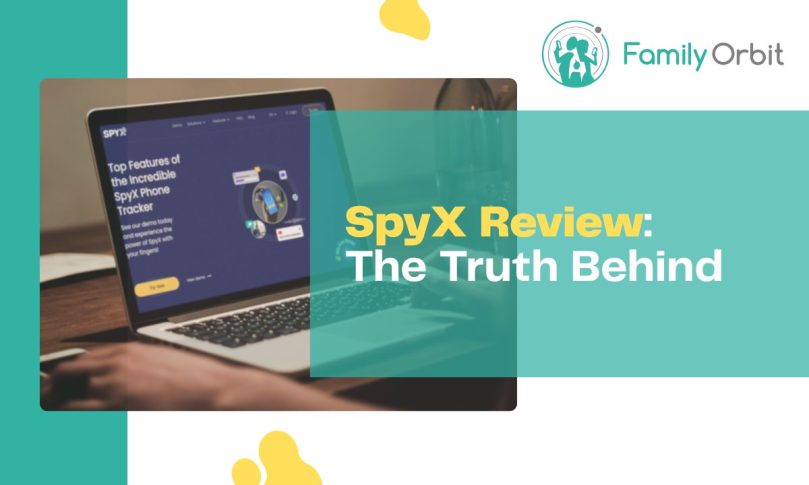
SpyX positions itself as a sleek, no-install parental monitoring app that can supposedly track texts, calls, social media, photos, and even real-time GPS simply by logging into a cloud account. If that pitch sounds familiar, it’s because it’s almost identical to mSafely—and for good reason. Both apps appear to come from the same network of companies, with SpyX being operated by Gbyte Technology Co., Limited, a Hong Kong–based entity.
On the surface, SpyX promises parents an effortless way to “keep their kids safe.” But scratch beneath the glossy website, and the story looks much darker. In 2024, SpyX was at the center of a massive data breach exposing nearly 2 million user records, including Apple IDs, location data, and other sensitive information. Security researchers flagged it as a serious privacy risk, but the company has never publicly acknowledged the incident or offered meaningful transparency about what was compromised. That silence alone should raise alarm bells for any parent considering handing over their child’s data.
And then there are the features themselves. Much like mSafely, SpyX markets access to Snapchat, Instagram, and even geofencing through nothing more than a Google or iCloud login. The reality? Those services don’t store private messages, geofence triggers, or real-time GPS in cloud backups. Which means many of SpyX’s headline claims are technically impossible without installing a full spyware app on the device.
In this review, we’ll break down how SpyX really works, where the marketing strays from reality, and why parents should think twice before trusting it with their family’s privacy.
How Does SpyX Work?
SpyX presents itself as a “no install needed” solution for both Android and iOS. At first glance, this sounds like a major convenience compared to traditional monitoring apps. But when you look closely, what SpyX actually does is far less powerful: it simply connects to iCloud accounts (for iPhone users) or Google accounts (for Android users).
On iPhone (iCloud Method)
To “monitor” an iPhone with SpyX, you’re asked to provide the child’s Apple ID and password. Once logged in, SpyX can only pull information that is synced into iCloud backups. That includes some contacts, photos, call logs, and notes—but not real-time app data.
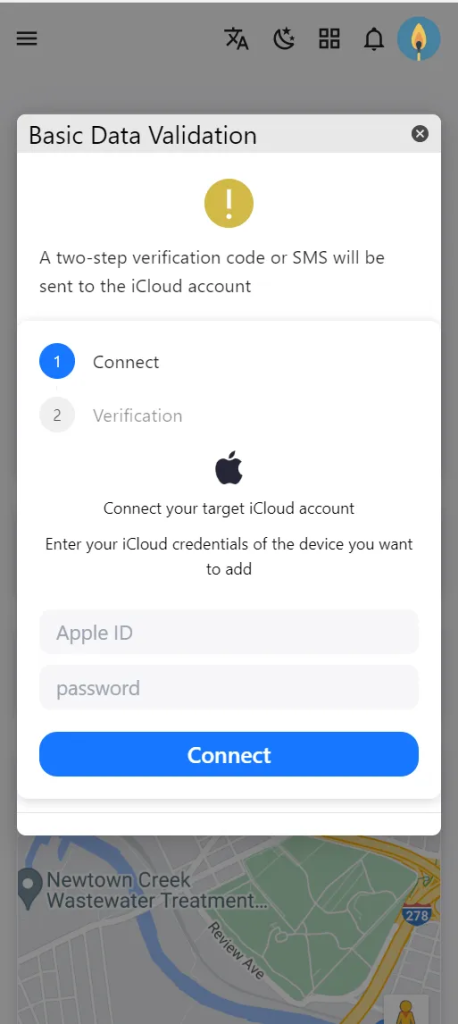
If two-factor authentication is enabled, you will also need physical access to the device at least once to grab the verification code. This already undermines the claim of being a totally remote solution.
| What SpyX Promises on iOS | What You Actually Get |
|---|---|
| Monitor WhatsApp, Snapchat, Instagram | Impossible via iCloud backups; social media chats are not stored in iCloud. |
| Geofencing and real-time GPS | Not supported. iCloud only syncs occasional location history (if enabled). |
| Deleted conversations | Not possible. iCloud only contains the most recent synced backup data. |
| Photos and videos | Available if the user syncs their Photos app with iCloud. |
On Android (Google Account Method)
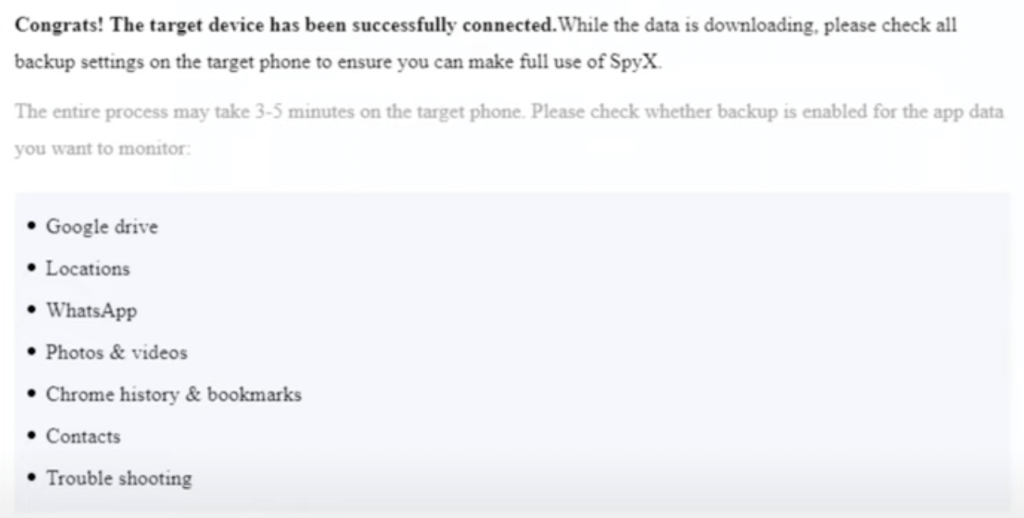
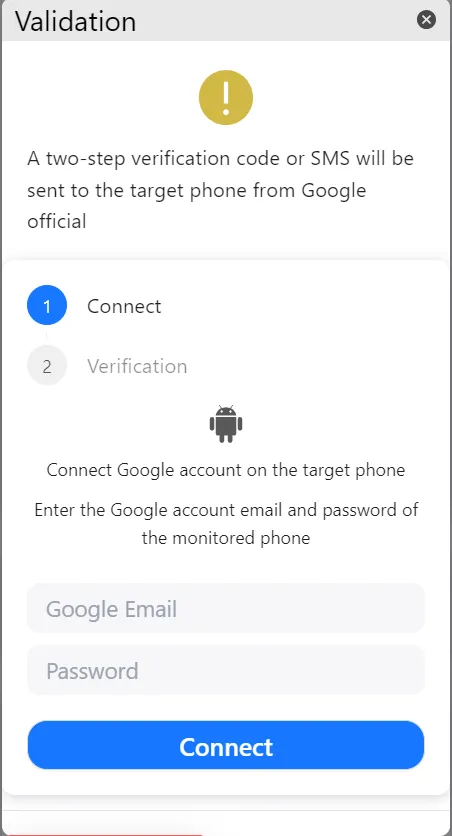
SpyX’s Android solution works the same way—except with Google credentials. After entering the target’s Google email and password (and passing SMS/2FA verification), SpyX says you’ll gain access to “30+ apps,” location data, and messages. In reality, Google accounts don’t store most of that data.
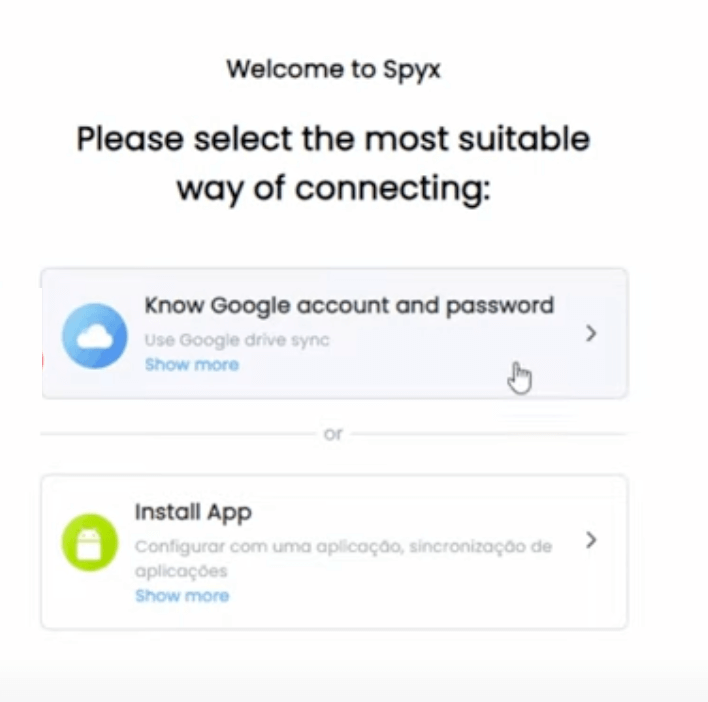
At best, you’ll see synced Google Photos, some Chrome browsing history, and maybe location history (if enabled). But you won’t see SMS messages, call logs, Snapchat, Instagram, or geofencing alerts—because Google never stores that information in the cloud.
Why This Is Misleading
The idea of monitoring without installing anything sounds attractive, but it’s simply not true for what SpyX advertises. Both Apple and Google restrict what’s stored in the cloud for privacy reasons. Neither platform saves sensitive chat logs or geofence triggers in a manner that allows third-party apps to retrieve them.
So when SpyX says you can track 30+ apps, monitor social media, and get real-time alerts—all through cloud logins—it’s essentially selling a fantasy.
Feature Reality Check
SpyX markets itself as an all-powerful parental control solution—monitoring “30+ apps,” real-time GPS, social media chats, and more. But since it only connects to iCloud and Google accounts, most of those claims are technically impossible. Here’s what SpyX promises vs what you really get:
SpyX: Promises vs. Reality
| Feature | What SpyX Promises | Reality (via iCloud/Google) |
|---|---|---|
| Social Media Monitoring | Full access to WhatsApp, Snapchat, Instagram, Messenger, Telegram, etc. | Impossible. Neither iCloud nor Google store third-party chat logs. |
| Real-Time GPS & Geofencing | Live location updates, geofence alerts when entering or leaving areas. | Not supported. iCloud may show past location history; Google may show past movements if enabled. No geofencing. |
| SMS & Call Logs | Access all texts and call history directly. | Not available through Google accounts. iCloud may include some logs in backups, but not guaranteed or real-time. |
| Deleted Conversations | Recover deleted messages and chats instantly. | Not possible. Backups overwrite old data; deleted messages are not stored in iCloud/Google. |
| Photos & Videos | See all media stored on the phone. | Works only if synced with iCloud Photos or Google Photos. Otherwise, no access. |
| Browser History | Track browsing and bookmarks in real time. | Partial access via Chrome sync or Safari iCloud sync. Limited, not complete monitoring. |
| Installation-Free Monitoring | No app install required; full monitoring via login only. | Misleading. You need credentials + 2FA verification, and even then, most promised features don’t work. |
My Hands-On Test with SpyX
Trying the Android (Google Account) Method
I started with SpyX’s Android option, which only asks for the target’s Google email and password. After entering credentials and completing the 2FA verification code sent to the device, the dashboard unlocked.
At first, SpyX made it look like I had access to “30+ apps” and real-time monitoring. But once I dug deeper, it became obvious how little data was actually there. What I saw:
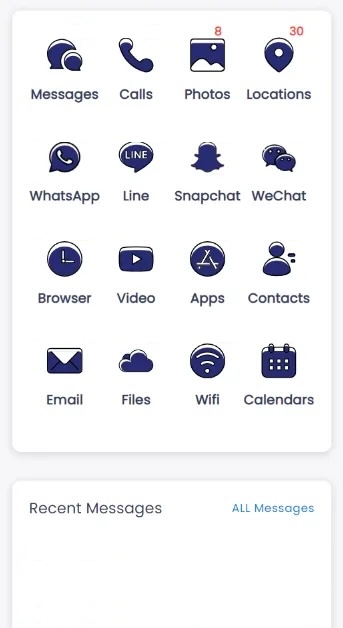
- Google Photos that were synced to the account. If the person wasn’t syncing photos, the folder was empty.
- Chrome browsing history—but only if Chrome sync was turned on.
- Google Location History, which worked only if “Location History” was enabled in the account settings. Even then, it showed past visits, not live GPS.
What I didn’t see were the big-ticket features SpyX advertises: no SMS messages, no call logs, no WhatsApp, no Instagram, no Snapchat, and definitely no geofencing. In short, the “monitoring” was just a thin wrapper around existing Google services.
Trying the iPhone (iCloud) Method
Next, I tested the iPhone option by entering an Apple ID and password. Just like with Android, two-factor authentication became available, meaning I still needed physical access to the iPhone anyway.
Once logged in, SpyX pulled whatever was available from iCloud backups. I could see:
- Some contacts, notes, and call logs, but only if they were included in the most recent backup.
- Photos and videos, again, only if iCloud Photos was enabled.
- Location history, but only as part of Find My or backup data—not continuous GPS tracking.
But once again, the key advertised features were missing. There was no real-time monitoring, no Snapchat or Instagram chats, no keyword alerts, and no geofencing. Deleted messages also didn’t appear—iCloud overwrites backups, so once something is gone, SpyX can’t magically bring it back.
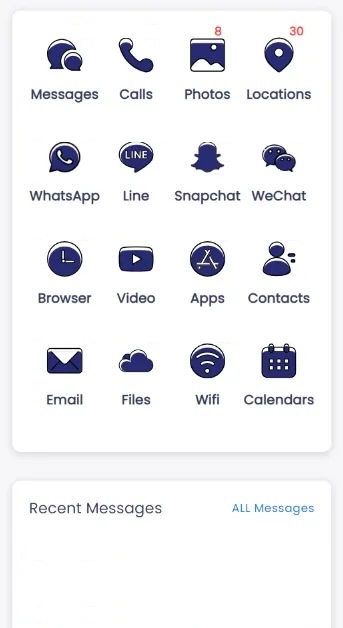
Overall Impression
After testing both methods, the results were disappointing. SpyX gives the illusion of a powerful monitoring suite, but in reality, it’s just showing you whatever limited scraps Apple or Google happen to store in the cloud. If your child doesn’t back up to iCloud or doesn’t use Google Photos, you’ll see almost nothing.
The marketing around “30+ apps,” “real-time GPS,” and “deleted messages” simply doesn’t match reality. What you actually get is far less—and nowhere near enough for parents who need reliable, day-to-day monitoring of their child’s safety.
SpyX Pricing – Confusing and Costly
SpyX looks cheap at first, but once you start reading the fine print, it’s the same old bait-and-switch we’ve seen with mSafely and other clones.
What SpyX Advertises
SpyX sells three subscription tiers:
| Plan | Price (Advertised) | Reality Check |
|---|---|---|
| 1 Month | $49.98 | High price for vague “monitoring” — most features missing without upsells. |
| 3 Months | $27.77/mo | Cheaper monthly rate, but billed upfront, and still limited in features. |
| 12 Months | $11.66/mo | Annual plan looks attractive but renews automatically at higher rate and comes with no refunds. |
The Hidden Catches
- No free trial: only a “demo” dashboard with fake data.
- Upsells inside: many users report SpyX asking for more payments after subscribing to unlock “premium” features.
- No refunds: their policy is restrictive, and refund requests often go unanswered.
- One device only: each license covers just a single device, no matter which plan you buy.
Family Orbit: A Transparent Alternative
| Plan | Price | What You Get |
|---|---|---|
| Trial | $7 (7 days) | Full features, no restrictions. Cancel anytime. |
| Monthly | $29.95 | Up to 5 devices per plan, includes GPS history, geofencing, SMS/call logs, photos, apps, AI alerts, and support. |
Family Orbit – A Smarter Alternative
SpyX thrives on flashy promises—monitor 30+ apps, track locations in real-time, recover deleted chats—but in practice, it delivers almost none of these. Instead, you’re left with scraps from iCloud or Google accounts, expensive subscription tiers, and one-device limits.
Family Orbit takes a very different approach. It’s built for parents, not hackers, with features designed to actually help families stay safe online. Instead of pretending to monitor Snapchat or Instagram without installing an app, Family Orbit focuses on what matters: reliable GPS tracking, geofencing alerts, device activity insights, and tools that work seamlessly across both Android and iOS.
Most importantly, it does this with honesty and transparency. One subscription covers up to five devices, with straightforward pricing and no hidden upsells.
| Category | SpyX | Family Orbit |
|---|---|---|
| Monitoring Method | iCloud & Google login only | Dedicated Android & iOS apps with parental dashboard |
| Social Media Monitoring | Promised but not possible via cloud | Focus on SMS, call logs, and alerts that work without jailbreak/root |
| Location Tracking | Occasional history from Google/iCloud (if enabled) | Real-time GPS, continuous history, geofence alerts |
| Devices per License | 1 device | Up to 5 devices |
| Pricing Transparency | Confusing, upsells, no refunds | $7 trial, then $29.95/month — all features included |
| Privacy & Security | Past data breach, no disclosure | No data reselling, parent-managed access, transparent policies |
The Takeaway
SpyX may lure parents with bold claims, but once inside, the lack of real features and poor transparency quickly show through. Family Orbit, on the other hand, provides a reliable set of tools with real-world functionality and family-friendly value.
FAQs About SpyX
How does SpyX work?
SpyX works by asking for the target device’s iCloud login (iPhone) or Google login (Android). Once connected, it pulls whatever data is stored in those cloud accounts—such as synced photos, some location history, or browsing data. However, it cannot actually retrieve WhatsApp, Snapchat, Instagram chats, SMS, or real-time GPS because that information is not stored in Apple or Google accounts. The advertising suggests full monitoring, but in reality, you only get limited backup data.
Is SpyX legit?
SpyX is a real app operated by Gbyte Technology Co., Limited (Hong Kong). However, its marketing is widely considered misleading. It promises features that are not technically possible with just cloud logins, and it has been linked to a major data breach affecting nearly 2 million accounts. Many user reviews describe it as deceptive or a scam, citing hidden costs, missing features, and poor support.
Does SpyX work?
It “works” in the sense that it connects to iCloud or Google accounts, but it does not deliver the full social media or text monitoring it promises. At best, you may see synced photos, some contacts, partial browsing history, and location history if enabled. Features like Snapchat, Instagram, WhatsApp chats, SMS, call logs, and geofencing do not work. So yes, it runs—but it does not work as advertised.
What is SpyX?
SpyX is a parental monitoring app marketed as a no-install solution for iOS and Android. It claims to monitor 30+ apps, recover deleted messages, and provide real-time GPS tracking. In practice, it’s just a cloud-login based service with limited data access. Critics view it as a rebranded clone of mSafely, operated by the same Chinese-backed companies.
How to install SpyX on iPhone?
There is no app to install. SpyX requires you to enter the target’s Apple ID and password into its dashboard. It then attempts to access whatever is stored in iCloud backups. You will need physical access to the device once to enter the two-factor authentication code. Without iCloud backup enabled, SpyX cannot collect any meaningful data.
How to install SpyX on Android?
SpyX does not install an app on the Android phone. Instead, it requires you to provide the phone’s Google account login and password. After logging in and passing SMS/2FA verification, SpyX shows synced Google account data (Photos, Chrome history, and possibly Location History). It cannot access SMS, calls, or social media chats because Google does not store that information in the account.
How much is SpyX?
SpyX subscriptions are:
• 1 month: $49.98
• 3 months: $27.77/month (billed upfront)
• 12 months: $11.66/month (billed upfront)
Each plan covers only 1 device. There is no free trial—only a demo with fake data—and refund requests are rarely honored.
How to cancel SpyX subscription?
Cancellation is difficult and often cited in negative reviews. Officially, you must log into your SpyX account, go to Account → Subscription, and click “Cancel.” However, many users report continued billing even after attempting cancellation, with unresponsive or automated support. This is one of the biggest complaints against SpyX’s business practices.
Final Verdict: Is SpyX Worth It?
SpyX is marketed as a powerful, no-install parental monitoring solution, but in reality, it falls far short of its promises. By relying solely on iCloud and Google logins, SpyX can only pull limited data—like synced photos, some browsing history, or occasional location history if enabled. Features like WhatsApp, Snapchat, Instagram monitoring, real-time GPS, geofencing, and deleted messages simply do not work.
The bigger concern is trust. SpyX is operated by Gbyte Technology Co., Limited, out of Hong Kong, the same network behind mSafely and other clones. The company has been linked to a massive data breach affecting nearly 2 million users—a breach it has never formally acknowledged. Pair that with confusing pricing, one-device limits, hidden upsells, and poor cancellation practices, and SpyX looks more like a cash grab than a serious parental tool.
For parents, this isn’t just about saving money—it’s about safety, privacy, and peace of mind. Handing over your child’s iCloud or Google credentials to a company with this track record is a huge risk. And even if you do, you won’t get the features you were promised.
If you want genuine family monitoring, Family Orbit is the smarter path:
- Real-time GPS and geofencing that actually work.
- Coverage for up to 5 devices in a single plan.
- Full transparency on pricing—$7 trial, then $29.95/month.
- No hidden upsells, no data reselling, and responsive support.
👉 Bottom Line: SpyX is all marketing, no delivery. For parents who want real tools they can rely on, Family Orbit is the safer, more effective alternative.
- Monitor Calls & Text Messages
- View Photos and Videos
- Location Tracking & Geofence
- Monitor WhatsApp & Kik
- Detect & Alert for Inappropriate Activities
- Monitor Websites Visited
- Compatible with Android and iOS