
Have you ever gotten a random text or missed call and thought, “Whose Instagram is this number connected to?”
You’re not the only one.
About 70% of social media accounts are tied to phone numbers, which makes that question tempting — almost too tempting.
But before you start Googling “find Instagram by phone number,” here’s the truth: sometimes it’s possible, but not in the way most blogs or apps claim.
This isn’t a list of secret hacks. It’s a practical, honest guide that explains what actually works — and what to avoid.
Can You Directly Search Instagram by Phone Number?
Let’s get this out of the way first: No, you can’t type a phone number into Instagram’s search bar and expect to find an account.
Instagram doesn’t let you do that — and for good reason.
The platform keeps contact data private to protect users from spam, stalking, and unwanted lookups.
So, if you see an app or website claiming to “find any Instagram account from a phone number,” walk away. They’re either guessing, scraping public info, or trying to trick you into handing over data.
The only legitimate method is through contact syncing, which we’ll cover next.
How to Find Someone’s Instagram by Phone Number (Step-by-Step)
If you’re serious about trying to find someone’s Instagram using their phone number, there’s only one legitimate way — through Instagram’s built-in contact sync.
This feature was originally designed to help you connect with friends you already know, not strangers you’re trying to look up.
Still, it can work if the person registered their Instagram account with the same number you have saved — and they haven’t disabled discovery.
Here’s how to do it safely and correctly 👇
Step 1: Save the Phone Number Properly
Before opening Instagram, save the person’s number to your phone’s contacts.
Make sure it includes the country code — for example, “+1” for U.S. numbers, “+44” for the U.K., or “+971” for the UAE.
If the number is stored without that prefix, Instagram’s system might not recognize it when syncing.
It’s also best to save the contact under a clear name (like “Emma T – School PTA”) so you can identify it later in the suggestion list.
👉 Tip: Double-check that you’ve only saved the number once. Duplicate entries can confuse the sync process.
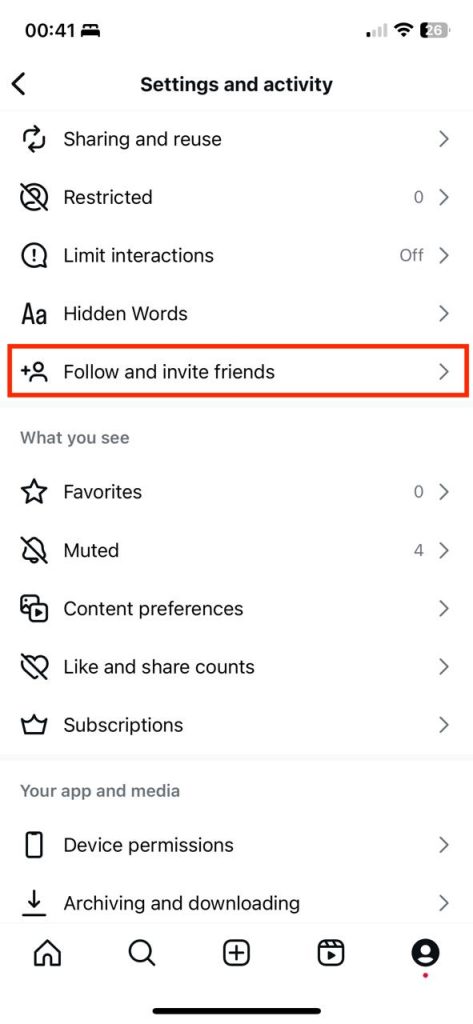
Step 2: Open Instagram → Profile → Menu → Follow and invite friends
Now open your Instagram app and head to your profile — that little avatar icon in the bottom-right corner.
Tap the three horizontal lines (☰) in the top-right corner to open the main menu.
Inside, you’ll find an option labeled “How others can interact with you.” Tap it, then tap “Follow and invite friends,” depending on your app version.
This is where Instagram quietly does its matchmaking magic.
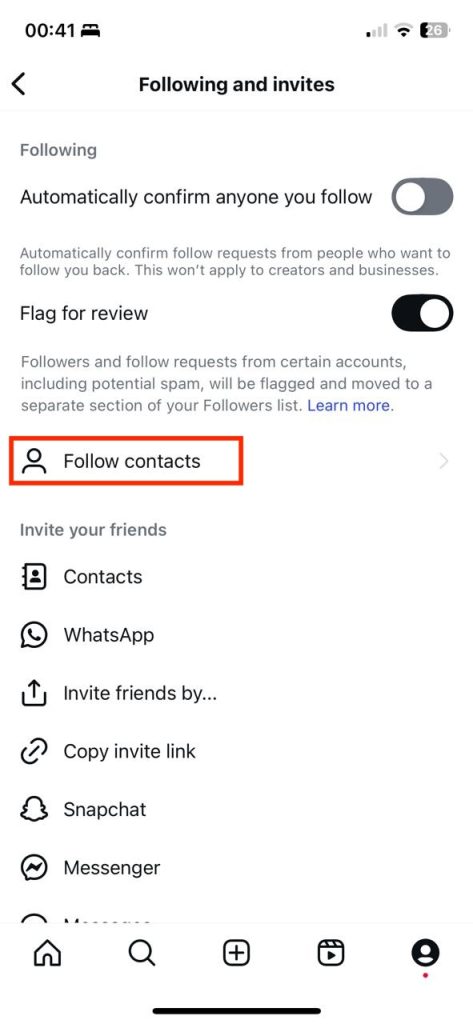
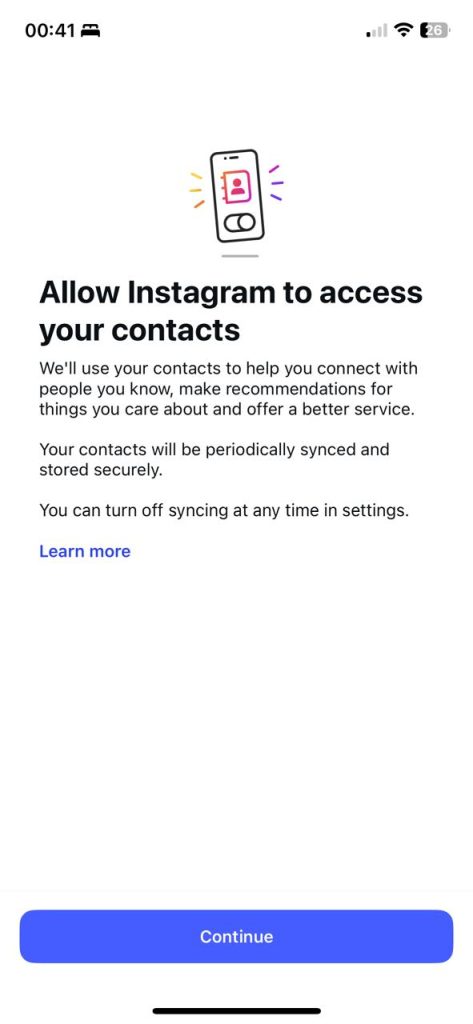
If this is your first time opening it, you’ll probably see a message asking permission to access your contacts. Don’t worry — Instagram isn’t grabbing your full address book and publishing it; it’s just checking for matches.
Step 3: Turn On Contact Syncing
Once you’ve given permission, Instagram uploads a hashed (that means scrambled and unreadable) version of your contacts.
It then compares those hashes against its database to find accounts registered with the same numbers.
If it finds a match — and if that user has allowed “discovery by contacts” — their account may appear in your “Suggested for You” list.
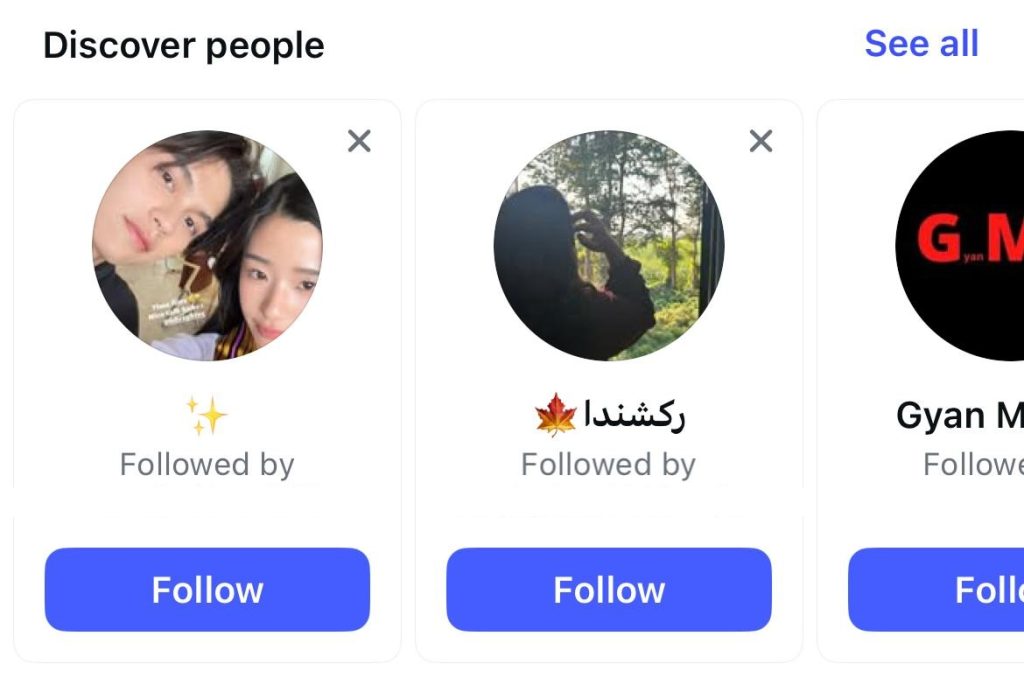
You can keep syncing turned on to automatically refresh suggestions as your contacts change. Or, if you only need it once, you can disable it again afterward (I’ll explain how later).
💬 Reality check: Some people think syncing gives them a magic list of every account tied to that number. It doesn’t. You’ll only see what users have made discoverable — and that’s a small but intentional privacy boundary.
Step 4: Wait for Suggestions to Load — and Scroll Carefully
Instagram doesn’t always show results instantly. It can take a few minutes for contact-based suggestions to appear, especially if you’ve just turned syncing on.
While waiting, scroll through your suggestion list. Instagram mixes in both contact matches and algorithmic recommendations (mutual friends, common interests, etc.).
If the person you’re looking for appears, great — you can tap Follow or check their bio to confirm it’s really them.
If not, don’t jump to conclusions. It usually means one of three things:
- They registered with a different phone number.
- They turned off contact discovery.
- They used email instead of a number when signing up.
Step 5: Optional — Try Facebook/Meta Integration
Because Instagram and Facebook share the same parent company (Meta), sometimes connecting your Facebook account can help surface hidden suggestions.
If both platforms are linked to the same number or email, you might see crossover recommendations.
To try this:
- Go to your Instagram → Settings → Accounts Center.
- Tap “Add Facebook Account” if it’s not already linked.
- Once connected, refresh “Discover People” again.
This trick doesn’t always work, but occasionally it brings up an account that didn’t show before — especially if the person uses Facebook more actively than Instagram.
💡 Pro Tip
If nothing appears, don’t assume Instagram’s broken.
It’s far more likely the person disabled contact discovery or uses a different number for their account.
Some people separate personal and business accounts, or register with email only. Others deliberately keep their number private — and that’s their right.
If the goal is just to reconnect, consider sending them a friendly message or asking a mutual friend for their handle instead of chasing sketchy “finder” tools.
How to Do It on Web/Desktop
Unfortunately, this feature is mostly mobile-only.
You can browse “Discover People” on a desktop, but you can’t sync new contacts or upload numbers from your computer.
If you’re serious about trying this, use the Instagram mobile app.
Alternative Ways to Find Someone on Instagram (Beyond Numbers)
If the phone-number route didn’t get you anywhere, don’t worry — that’s pretty common.
Most people either hide their contact info or use a different number when signing up.
But there are still a few legitimate and clever ways to find someone on Instagram, without breaking rules or resorting to shady apps.
Here’s what actually works:
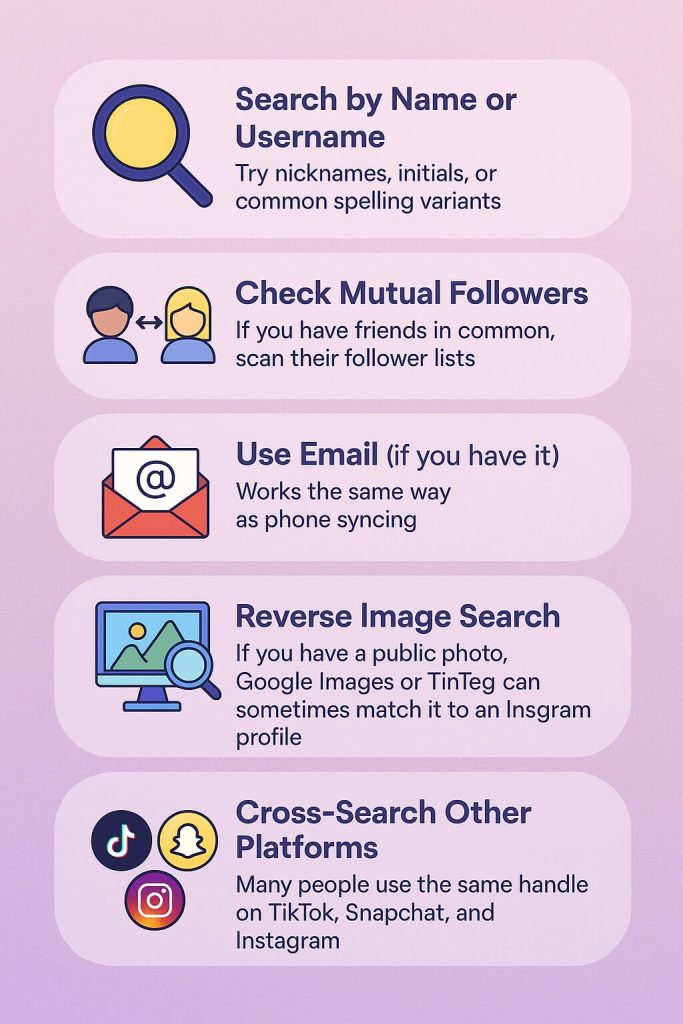
1. Search by Name or Username
Sometimes the simplest trick works best.
Head to Instagram’s search bar or the anonymous Instagram viewer, and type the person’s first and last name, or a mix of nicknames and initials.
If their name is common, try adding a clue like their city, hobby, or workplace.
For example:
- “Emma T New York”
- “Jake photography”
- “SarahG fitness coach”
People also tend to use variations of their real name as usernames — maybe adding underscores, dots, or numbers.
So if you’re looking for “TylerGrant,” also check “tyler.grant,” “tyler_grant1,” or “grant.tyler.”
If you’ve met through work, school, or an event, check hashtags or tagged posts from those places — you might see their handle pop up in a photo caption or comment.
2. Check Mutual Followers or Friends
Instagram’s social graph is powerful — and often more revealing than a search bar.
If you share mutual friends, scroll through their “Following” or “Followers” lists.
Yes, it’s a little manual, but if your circle isn’t huge, it can be surprisingly effective.
You can also look at post comments from your friends — maybe the person you’re looking for left a reaction or emoji somewhere.
I once found an old coworker that way — she’d left a comment on another friend’s birthday post.
A quick tap on her profile photo, and there she was.
3. Use Email (If You Have It)
Instagram treats email addresses almost the same as phone numbers.
If you’ve ever emailed the person or they’ve shared it publicly, try adding it to your phone’s contacts and turning Contact Syncing back on.
The same “Discover People” feature that looks up numbers can sometimes identify accounts tied to emails. You can also use a people lookup tool to see if you can find the social media accounts linked to that email.
It’s not 100% reliable, but if they use that email for Instagram login or notifications, it’s your best second option.
4. Try a Reverse Image Search
This one’s surprisingly useful if you have a public photo of the person — maybe from an event, a group picture, or a shared link.
Upload it to Google Images or TinEye and see where else it appears.
If they’ve used that same photo on their Instagram, LinkedIn, or another public page, it’ll often show up.
You can even use Google Lens on your phone to spot objects, logos, or landmarks in the background.
If it picks up a specific coffee shop, street art, or sports team, try searching Instagram hashtags for those details.
Sometimes, it leads right to the account.
⚠️ Just remember: this only works for public images. You can’t (and shouldn’t) reverse-search private photos or screenshots of someone’s stories.
5. Cross-Search Other Platforms
People love consistency — and that includes usernames.
If someone’s handle on TikTok, Snapchat, or Twitter (X) is “@the_real_ashley,” there’s a good chance they use a similar one on Instagram.
Type that handle directly into Instagram’s search bar.
Or just try this trick in your browser:
instagram.com/the_real_ashley
If the account exists, it’ll load even if you’re not logged in.
You can also use cross-platform username checkers like Namecheckr or KnowEm — they scan multiple social networks for that handle.
(Just don’t log in or give them your personal data.)
If you know what kind of posts they make, search hashtags related to those interests — for example, #AustinFoodie, #NYCFitness, or #GoldenRetrieverMom.
You’d be surprised how many profiles can be found through niche hashtags.
Location tags work too.
If you remember the restaurant, gym, or park they frequent, tap the location tag in other posts from that spot — Instagram will show a feed of everyone who’s posted there.
It’s a little detective work, but completely above board and sometimes faster than guessing usernames.
7. Ask a Friend (Still the Easiest Way)
This one’s underrated.
If you know someone who’s connected to them, just ask.
A simple, “Hey, what’s Jamie’s Instagram handle again?” is faster — and less awkward — than hours of blind searching.
Most people won’t mind sharing a public handle.
If none of these work, don’t stress.
Instagram isn’t meant to be a global phonebook — it’s meant to protect people’s privacy.
That’s actually a good thing.
But if your goal is to reconnect, or if you’re a parent trying to keep tabs for safety reasons, there are safer ways to stay informed — and that’s where Family Orbit comes in.
Why You Might Not Find Them
There are a few common reasons your contact won’t appear:
- They never linked their phone number to their Instagram.
- They’re using a different number.
- They turned off “Discover by Contacts.”
- Their account is private or deleted.
- You’re using an old or incorrect contact.
Sometimes, it’s not a tech problem — it’s just privacy by choice.
How to Stop Contacts from Syncing (Privacy Control)
Want to make sure you don’t show up in someone else’s “Discover People”?
Here’s how to disable it:
- Go to Settings → Account → Contacts Syncing.
- Turn off “Connect Contacts.”
- Tap “Delete Synced Contacts” to remove what’s already stored on Instagram’s servers.
This doesn’t affect your account — it just keeps your contact info private.
Some people disable it to reduce spam or keep their personal number disconnected from social media altogether.
Privacy and Safety Considerations (Why It’s a Good Thing)
As someone who’s spent years in tech — and as a mom — I’m actually grateful Instagram doesn’t make it easy to find people by phone number.
Imagine how unsafe that would be if anyone could search your teen’s number and find their photos instantly.
If my daughter could be located online just because someone got her number from a school roster, I’d lose sleep over it.
That’s why these protections exist. They reduce doxxing, stalking, and harassment.
It’s also in line with privacy laws like GDPR in Europe and CCPA in California, which require companies to minimize personal data exposure.
So yes, it can be inconvenient — but it’s also a blessing in disguise.
If You’re a Parent Trying to Find a Teen’s Instagram
Here’s the thing — curiosity often comes from love, not control.
You want to know what your teen is doing online because you care. I get that.
But before you try to “track down” their profile, start with a conversation. Ask them to show you their account, or talk about why certain apps feel off-limits.
If you need to monitor for safety — not spying — use a tool built for trust.
That’s why we built Family Orbit.
It helps parents:
- View public social activity (including Instagram posts and mentions)
- Track screen time and app usage
- Receive AI-powered alerts if harmful content appears
- See location history with full consent
No sneaky logins. No fake accounts. Just clarity when you need it most.
Because protecting your child shouldn’t mean invading their privacy.
Bonus: How to Protect Your Own Instagram from Phone Lookup
If you value your privacy, here’s how to prevent others from finding you by number:
- Go to Settings → Privacy.
- Scroll to “Who can find you by your phone number.”
- Turn off “Allow others to find me by my phone number.”
It’s a smart move for anyone — especially teens, influencers, or professionals who use the same number for business and personal life.
FAQs: Find Instagram by Phone Number
Can I find someone’s Instagram with just a phone number?
Sometimes, if you sync contacts and the user allows discovery. There’s no public search field for numbers.
Why doesn’t my contact appear on Instagram?
They might’ve used a different number or turned off contact discovery.
Can someone find my Instagram through my number?
Only if you linked it and left “allow discovery” turned on.
How do I remove my phone number from Instagram?
Settings → Account → Personal Info → Delete or replace your number.
Can I find social media accounts by phone number?
Some platforms allow limited discovery (like Telegram). Instagram restricts it for privacy reasons.
Is it legal to search someone’s Instagram by number?
Yes, if you’re using Instagram’s official sync feature. Third-party “finder” tools often violate terms of service or privacy laws.
What should parents do if they suspect a fake account linked to their child’s number?
Report it through Instagram’s “Report a Problem” tool. If it involves harassment, contact local authorities.
Conclusion: Connection Is Fine — Respect Is Better
You can try to find someone’s Instagram by phone number, but if you can’t, take that as a sign — they want privacy, and that’s okay.
Curiosity is human.
Respect is smarter.
And if you’re a parent trying to keep your family safe online, Family Orbit can help you stay informed — without crossing the line.
- Monitor Calls & Text Messages
- View Photos and Videos
- Location Tracking & Geofence
- Monitor WhatsApp & Kik
- Detect & Alert for Inappropriate Activities
- Monitor Websites Visited
- Compatible with Android and iOS