We’ve all been there – scrolling through Instagram, spotting the perfect photo, and rushing to take a screenshot before it’s gone. But here’s the problem: screenshots are low-quality, cluttered with interface icons, and can even breach Instagram’s terms of use.
If you want to save Instagram photos in full quality – without cropping, blurring, or risking your privacy — there are smarter ways. Here are five easy, ethical, and high-quality methods to save your favorite photos from Instagram without ever touching the screenshot button.
🥇 Method #1: Use the Family Orbit Instagram Viewer (Easiest and Safest)
If you want a simple, private, and high-quality way to save photos, start here.
The Family Orbit Instagram Viewer lets you view and download public Instagram photos directly from your browser – no login, no app install, and no screenshot needed.
Why it’s the best option:
- Keeps full photo resolution – no blur or cropping.
- 100% private – you don’t need to log into Instagram.
- Works on any device (phone, tablet, or computer).
- Great for parents monitoring public content or for users who want to save inspiration posts safely.
How to use it:
- Go to the Family Orbit Instagram Viewer.
- Paste the Instagram profile or post link.
- View and download the image in seconds.
It’s that easy — and unlike random third-party tools, it’s privacy-first and family-friendly.
Try It Now — Inline Username Form
Try the Anonymous Instagram Viewer
Enter any public Instagram handle and view posts without logging in.
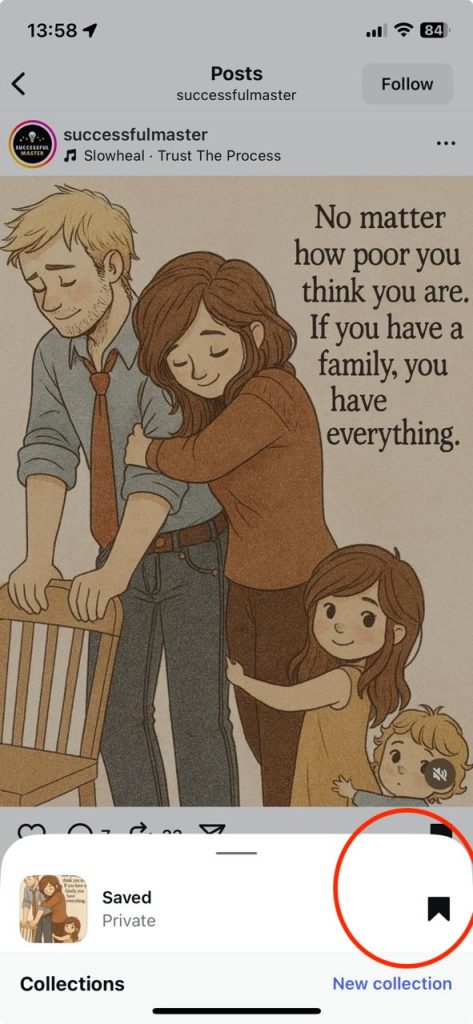
Method #2: Use Instagram’s Built-in “Save” Feature
Instagram actually gives you a built-in way to save posts — but it only stores them inside your account, not in your phone’s gallery.
How to use it:
- Tap the bookmark icon below any post.
- The photo is saved to your “Saved” collection.
- Access it later from your profile → Menu → Saved.
Pros: Easy and safe.
Cons: Doesn’t save the photo to your camera roll or work offline.
Method #3: Use Your Browser to Save Images on PC (Advanced Trick)
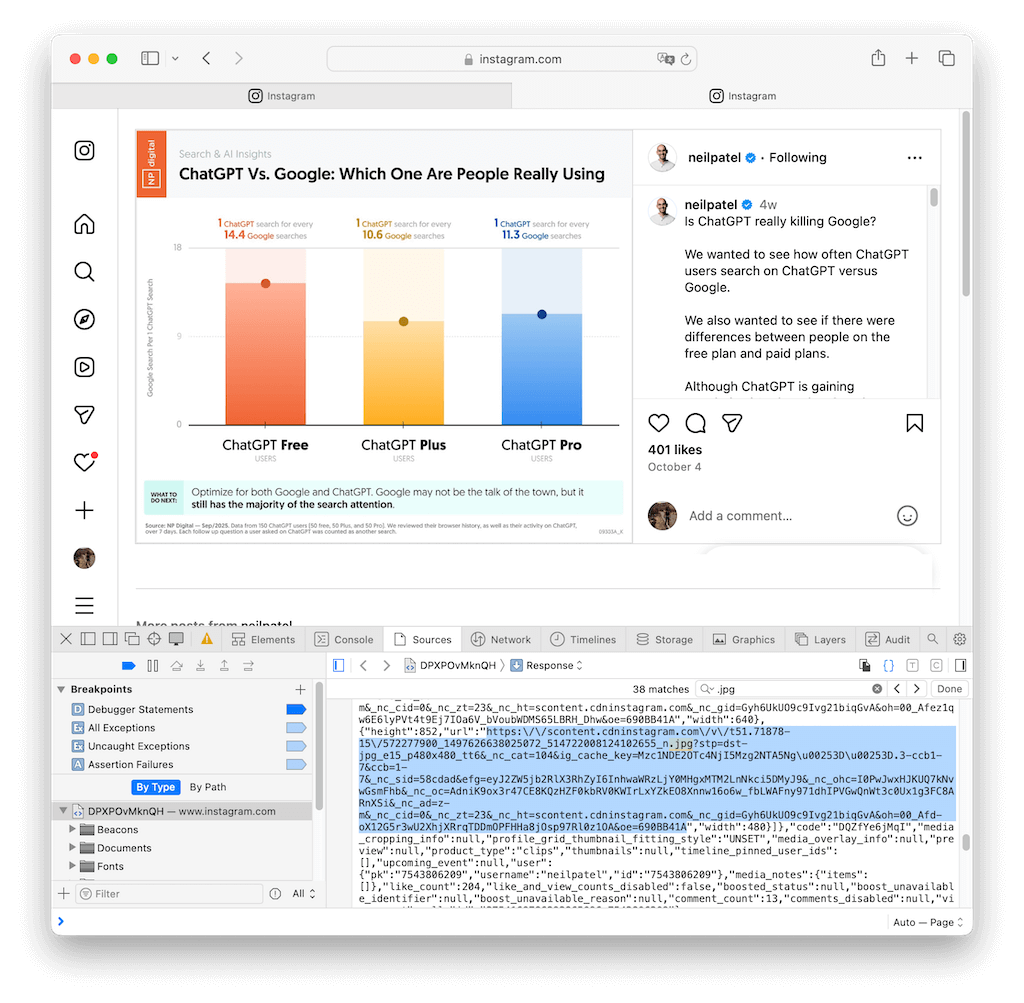
If you’re on a desktop, you can find the original photo file using your browser’s developer tools.
Steps:
- Open the Instagram post on a browser.
- Right-click the page → “Inspect” or “View Page Source.”
- Use
Ctrl + Fand search for “.jpg”. - Copy the full image URL and open it in a new tab.
- Right-click → “Save image as.”
Pros: Highest possible quality.
Cons: A bit technical, and doesn’t work for private posts.
Method #4: Try Trusted Online Downloaders
Several websites allow you to paste an Instagram post link and instantly download the photo.
One Popular example is Toolzu.
How to use:
- Copy the post link from Instagram.
- Paste it into the downloader’s search bar.
- Choose image quality → download.
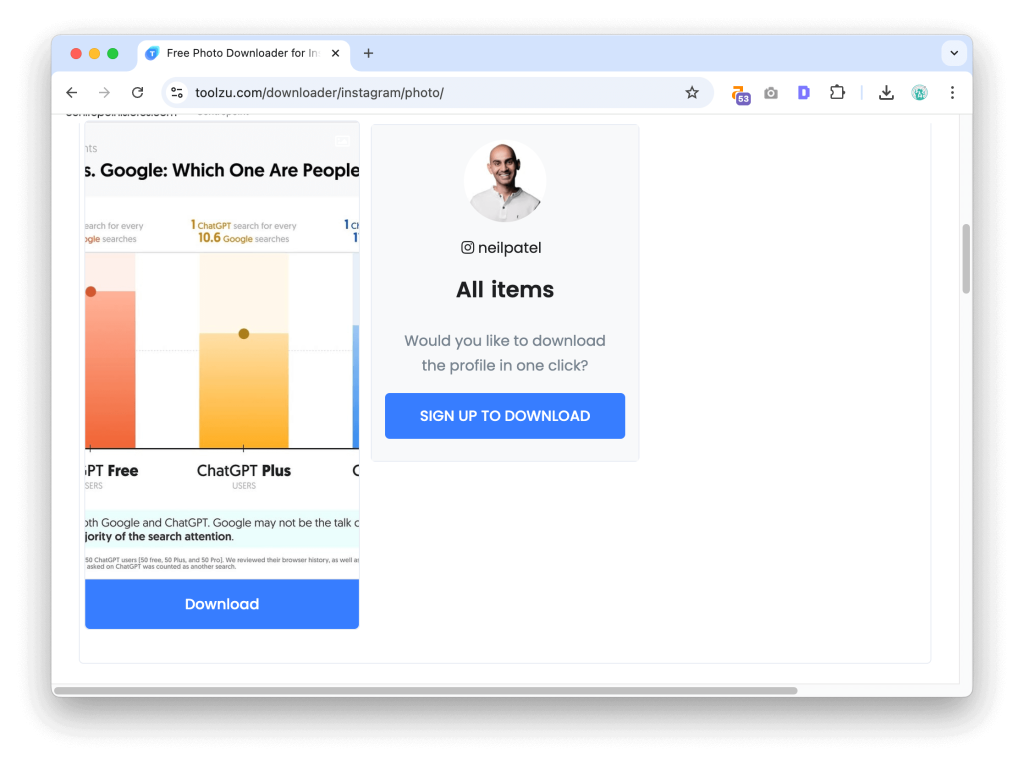
Pros: Quick and straightforward.
Cons: Always check site credibility — avoid spammy pop-ups or data requests.
This one’s a quick hack for mobile users.
Steps:
- Tap the three dots (…) on any public post.
- Choose Share → Copy Link.
- Paste that link into your browser.
- Tap and hold the photo → Add to Photos (iPhone) or Download Image (Android).
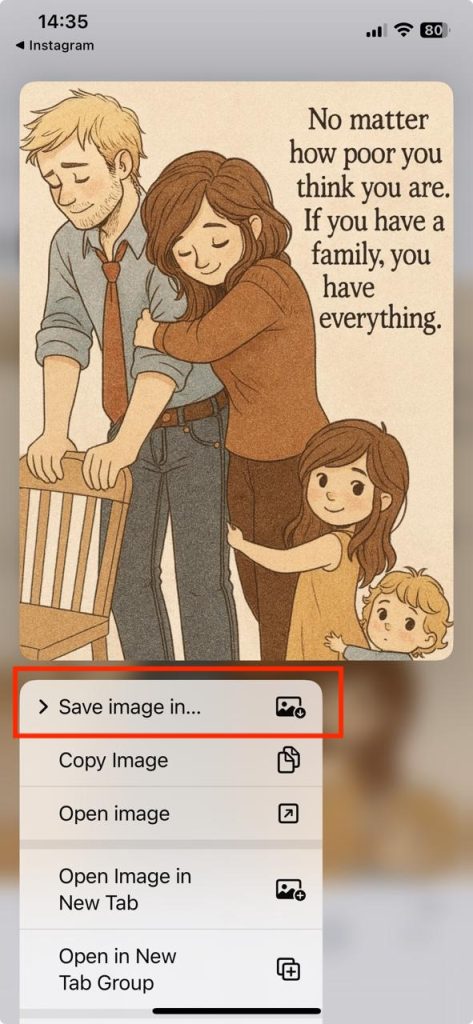
Pros: No apps or accounts needed.
Cons: Slightly slower for multiple saves.
Why Screenshots Are a Thing of the Past
Screenshots are fast — but they come at a cost:
- Poor image resolution.
- Extra cropping and app interface clutter.
- Potential privacy violations if notifications appear.
- Possible copyright infringement if reused publicly.
It’s time to retire the screenshot habit. The above methods, especially the Family Orbit Instagram Viewer, let you save clean, full-quality photos safely and responsibly.
Bonus: Stay Ethical When Saving Instagram Photos
Before you hit download, remember:
- Respect ownership. Always credit photographers if you share their work.
- Don’t use private posts. Saving or redistributing private content is against Instagram’s policy.
- Use tools responsibly. Stick to viewing and saving publicly shared content.
A little mindfulness keeps the internet safer for everyone — and helps you enjoy great content guilt-free.
Frequently Asked Questions (FAQ)
1. How to save pictures from Instagram to gallery?
You can either use the built-in Save to Files option on iPhone/Android or download them directly using a tool like the Family Orbit Instagram Viewer, which stores high-quality images without needing screenshots.
2. How to save others’ Instagram photos to gallery on Android?
Copy the post link → paste it in your browser or the Family Orbit Instagram Viewer → tap and hold the image → choose Download Image.
3. How to save photos from Instagram DM to gallery?
Tap the photo in your DM → open it fullscreen → press and hold → choose Save (if it’s not a disappearing photo).
For disappearing photos, you can’t save them directly due to privacy rules.
4. How to save others’ Instagram photos to gallery on iPhone?
Tap the post → share → copy link → paste into Safari → long press → Add to Photos.
Or use the Family Orbit Viewer from Safari to save full-resolution images.
5. How to save Instagram photos without screenshot, Reddit users recommend?
Reddit users often recommend web-based tools and viewers that don’t require a login — exactly like Family Orbit’s free Instagram Viewer, which lets you download photos safely and privately.
6. How to save Instagram photos without a screenshot on Android?
Android users can copy the post link, open it in Chrome, then tap and hold the image to download — or use a privacy-safe option like the Family Orbit Viewer.
Conclusion: Smart Saving Is the New Screenshot
Screenshots used to be the go-to move, but now they’re just clunky relics of the past.
With tools like Family Orbit’s Instagram Viewer, you can browse, view, and save your favorite public photos in full quality — safely, privately, and ethically.
So next time you see a photo worth keeping, skip the screenshot and try the smart way instead.
Because in 2025, clean saves are the new screen grabs.
- Monitor Calls & Text Messages
- View Photos and Videos
- Location Tracking & Geofence
- Monitor WhatsApp & Kik
- Detect & Alert for Inappropriate Activities
- Monitor Websites Visited
- Compatible with Android and iOS