
Do you worry about your kids’ mental health, getting bullied, or being an abduction victim? If so, you’re not alone; these three top the concerns of surveyed American parents. Many also say they worry about their children getting attacked and having substance use issues.
But it’s not just their kids; many people in the U.S. also worry about personal and family safety. So much so that being able to keep themselves and their loved ones safe makes 70% of U.S. adults anxious.
One way to help ease your worries is to learn how to track location from WhatsApp. With its real-time location-sharing feature, you can stay up-to-date on where your loved ones are. You can also use it to get insights into where they’re going or doing.
This comprehensive guide will teach you how to use this WhatsApp feature, so please read on.
How to Track Location From WhatsApp
The most straightforward way to find someone’s location via WhatsApp is to ask them to share it. However, the device’s Location Services must first be on for this to work. A user must then also enable WhatsApp’s Location Permissions.
Turning on a Device’s Location Services
To enable Location Services on Android, go to Settings and tap Location. Toggle the switch; it should then say “On.”
To activate Location Services on an iPhone, launch the Settings app. Go to Privacy, then tap Location Services. Toggle the Location Services switch to enable it; it should turn green.
Enabling WhatsApp’s Location Permissions
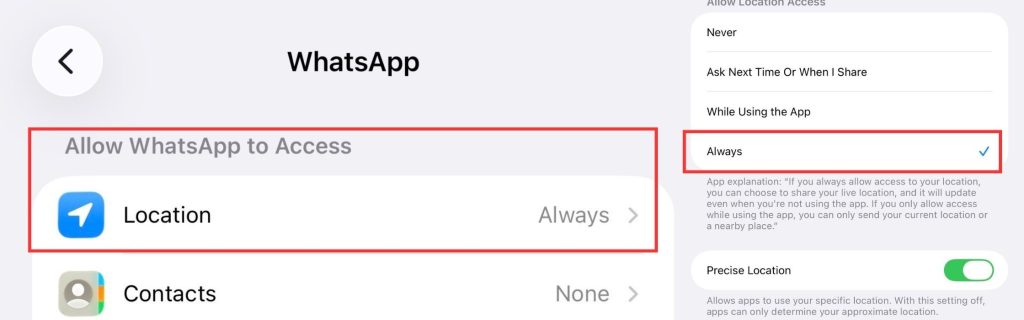
Location Permissions let apps access a device’s location. Users can allow apps to access their device’s approximate or precise location or both.
To permit WhatsApp to access an Android device’s location, go to Settings, then Apps. Tap WhatsApp, then Permissions, then Location. Turn on WhatsApp and select “Allow only while using the app” or “Ask every time.”
To do the same on an iPhone, launch the Settings app, then go to Privacy & Security. Tap Location Services and choose “Ask Next Time or When I Share,” “While Using the App,” or “Always.”
Viewing Someone’s Current Location on WhatsApp
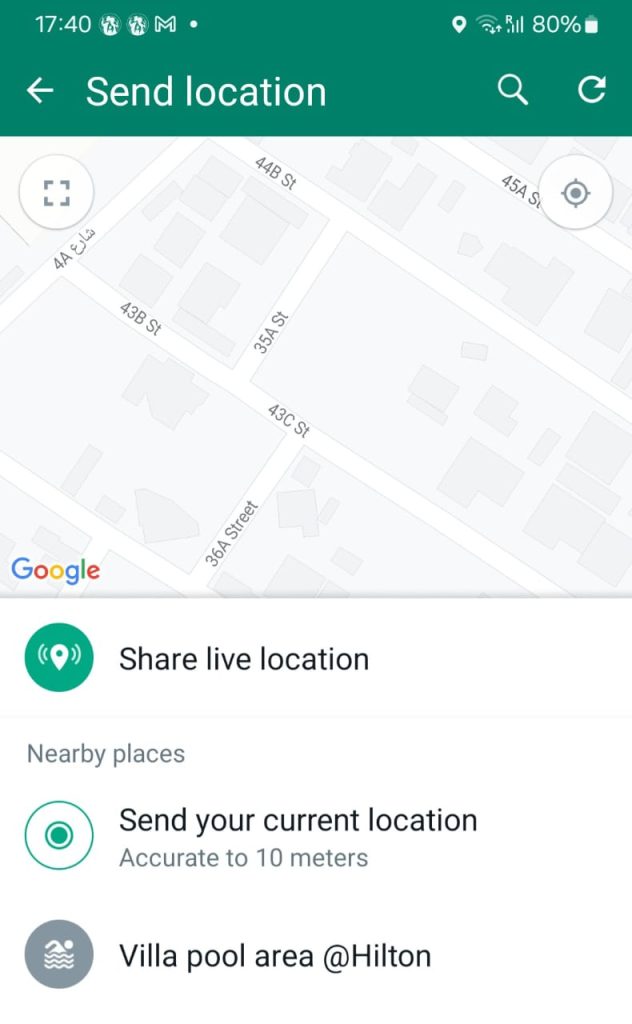
When a person lets you see their location on WhatsApp, they can send you just their current location. It’s a precise location, but is static, meaning it won’t change as the person moves about.
To send you their current location on WhatsApp, the person needs to open their chat inbox with you. If using an Android phone, they must tap the paperclip icon, Location, then Send Your Current Location. The steps are nearly identical on an iPhone, except a + icon replaces the paperclip one.
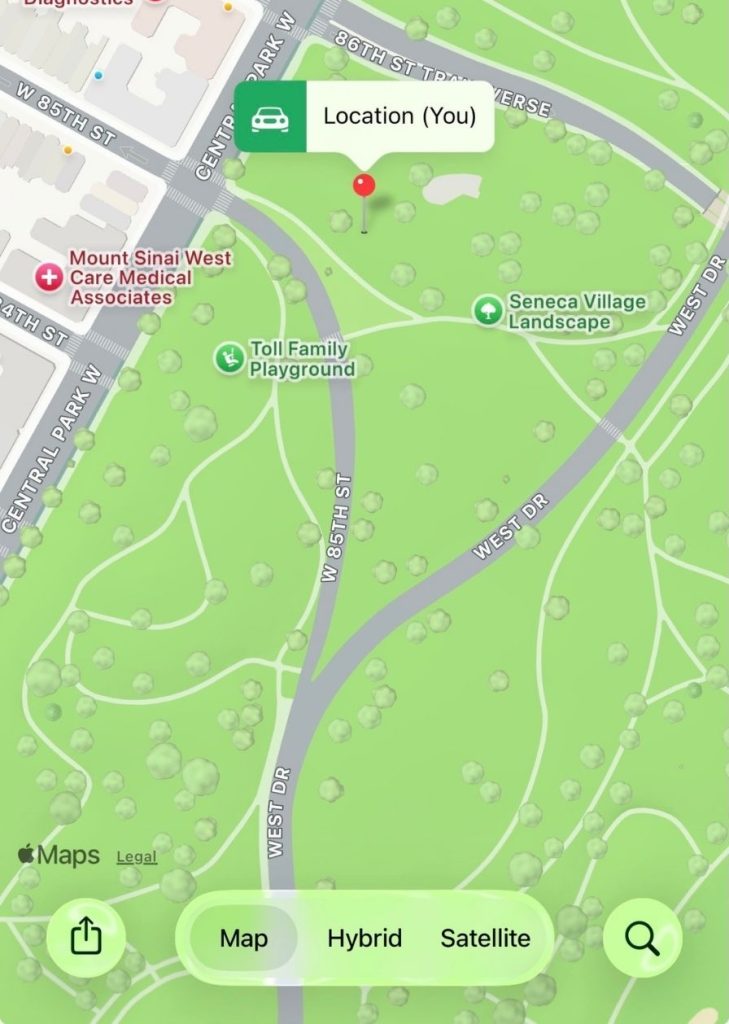
Once the person hits send, you’ll get a WhatsApp notification. When you open the chat, you should see a map thumbnail. Tap that, and you’ll see the person’s location from when they sent the message.
Viewing Someone’s Live Location on WhatsApp
Live Location is a feature that lets WhatsApp’s over two billion users share their real-time whereabouts. Users can dictate whether and how long they want others to see where they are. Because it’s real-time, their location on the map will move as they do.
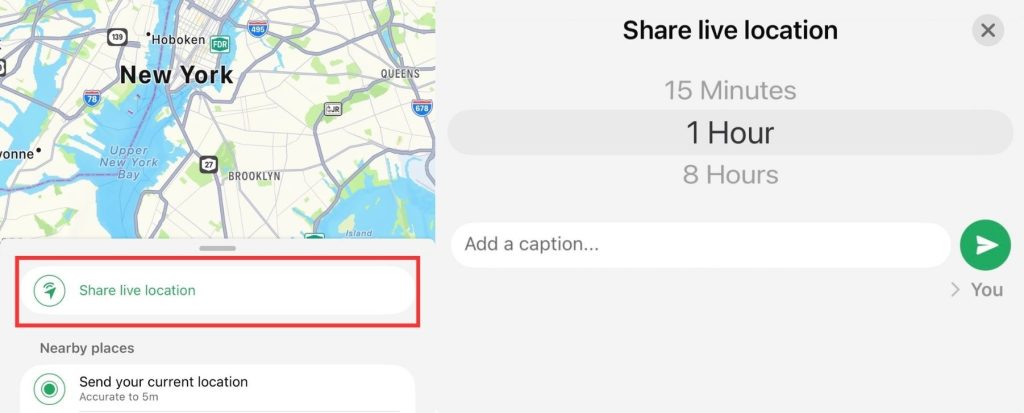
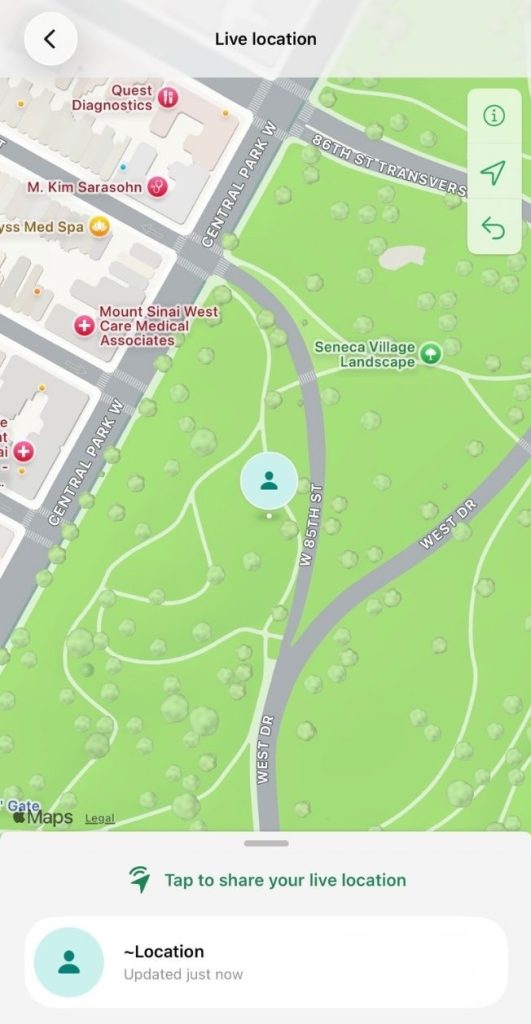
To send you their Live Location, a person must again open their chat inbox with you. If they’re on an Android device, they must tap the paperclip icon, Location, and Share live location. Again, the steps are similar on an iPhone, except they need to tap the + icon.
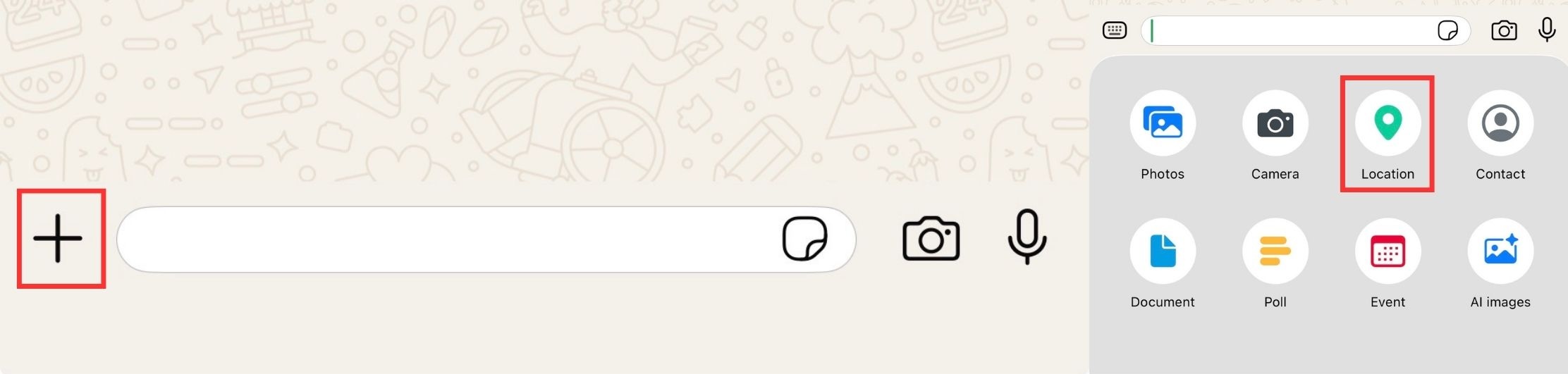
On Android or iPhone, the sender can choose a sharing duration of 15 minutes, 1 hour, or 8 hours. They can also stop sharing at any time, even before it expires.
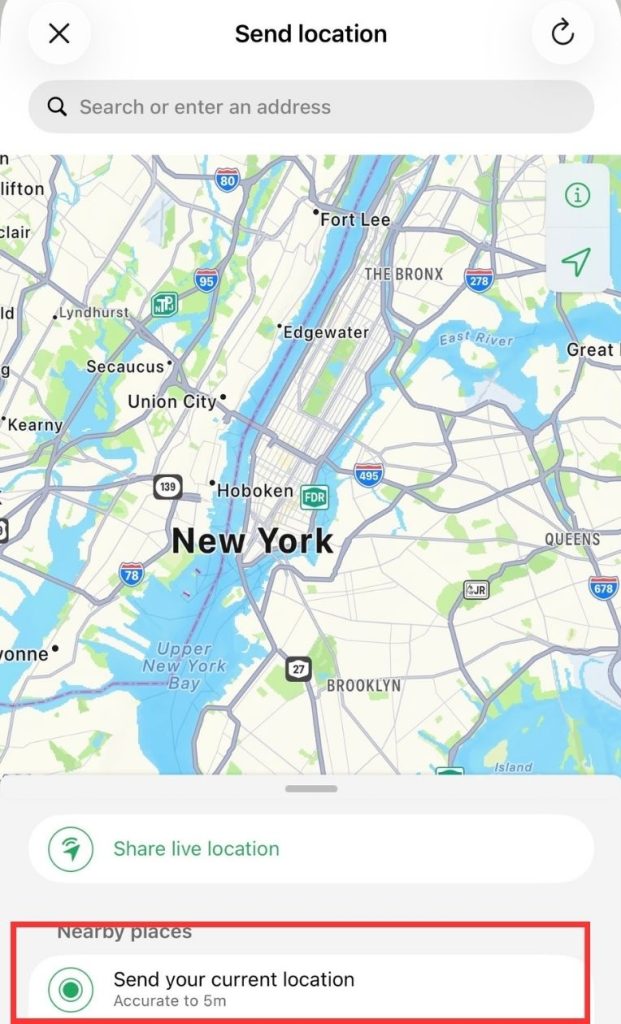
When stopped or expired, you’ll no longer be able to see their real-time whereabouts. However, you’ll still see a static thumbnail with the person’s last updated location.
How to Track Someone on WhatsApp
Say you have a teenager whose curfew is at 10 p.m. but is still not home by 10:30. You’ve tried calling them multiple times, but they haven’t answered. The friends they said they’d be with haven’t picked up your calls, either.
Or perhaps you’re traveling in a foreign place with your tweens or teens. They’re generally responsible, so you let them roam around within the area but asked them to meet up with you after 30 minutes. However, they’re now late for 5 or 10 minutes.
Those are all situations that can make any parent panic, especially since over 2,000 U.S. kids go missing every day. These are also the times that may force you to track them. After all, they may already be in harm’s way, making them unable to send you their location.
The good news is that some free apps can help you find a WhatsApp user’s location.
Use Life360 for Real-Time Location Sharing with Family
If you’re looking for a secure and trusted way to keep track of loved ones’ locations — especially family members or children — Life360 is one of the most reputable apps available.
🧭 What Is Life360?
Life360 is a family safety and location-sharing app that allows users in a private group (called a “Circle”) to share real-time locations with each other. It’s widely used by families and offers features like location history, driving reports, and even crash detection in premium plans.
📱 Key Features
- Real-time location sharing among trusted contacts.
- Custom location alerts (e.g., notify when someone arrives at school or home).
- Driving behavior reports (premium).
- Battery monitoring to see if a contact’s phone is low on power.
🔒 Privacy & Consent Focused
Life360 requires all users to opt in to location sharing and join a Circle using an invite code, which ensures full transparency and privacy.
✅ Why Life360 Is a Better Option
- Trusted and well-reviewed (millions of downloads on both iOS and Android).
- Designed for families — great for parents, teens, and elderly loved ones.
- Transparent location sharing — no deception involved.
- More features than apps that rely on a single SMS or unverified methods.
🧩 How to Get Started
- Download Life360 from the App Store or Google Play.
- Create an account and set up your family “Circle.”
- Invite others via a unique code or link.
- Once they join and accept location sharing, you can see each other’s live location.
⚠️ Important Reminder
Apps like Life360 are built for mutual tracking with trust and consent. They’re not meant for spying or covert monitoring — which is important both ethically and legally.
Use Google Maps Location Sharing Instead
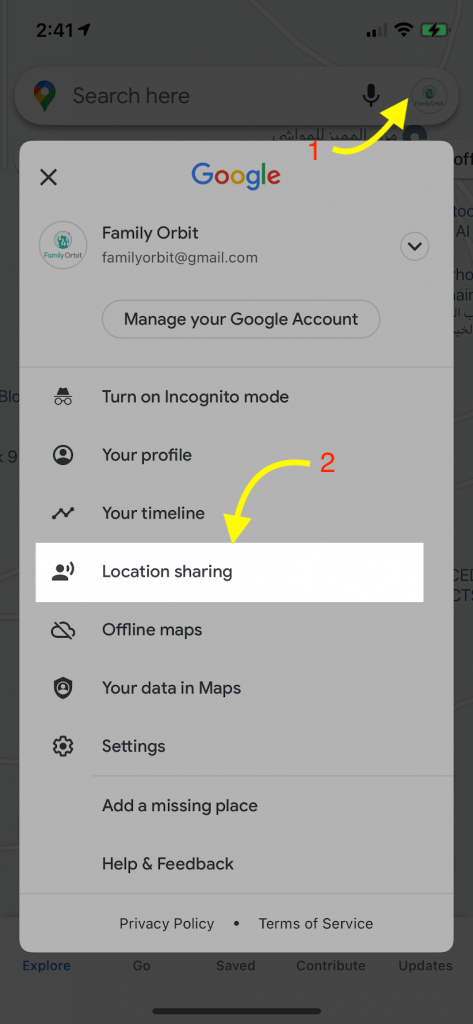
One of the most reliable and privacy-respecting ways to share real-time location is Google Maps’ built-in location sharing feature. Unlike unverified third-party apps, this method is free, secure, and requires consent.
🧭 How It Works
- The person you want to track must share their location with you using Google Maps.
- They can choose how long to share their real-time location — from 15 minutes to “Until you turn this off”.
- You’ll be able to see their movement on the map in real time if they have location services turned on.
📱 Steps to Use It
- Open Google Maps on the person’s phone.
- Tap on their profile icon > Location sharing > Share location.
- Choose how long to share the location and select your contact (e.g., WhatsApp or Gmail).
- You’ll receive a link you can open to view their live location in Google Maps.
✅ Why This Is Better
- No hidden tracking – it’s based on consent.
- Highly accurate – uses GPS and Google’s robust location tech.
- Built-in security – encrypted and integrated into Android/iOS.
- Trustworthy – backed by a reputable company (Google) with transparent privacy policies.
⚠️ Note
This method requires the person to willingly share their location. If you’re a parent, it’s ideal to set this up with your child’s consent for safety purposes. Secret tracking without consent is not only unethical—it may also be illegal depending on your jurisdiction.
The iSharing App

iSharing is another free location-sharing app that lets users share their live location. It requires downloading, installation, and signing up.
You can still use the iSharing app discreetly if you’re legally allowed to track another person, such as your minor kids.
Suppose you have a tween whose smart device runs on your Google account. In this case, you can perform a remote download and installation of the app using the Play Store’s Remote Installation feature. You can then use Chrome Remote Desktop to access your tween’s device from afar and set up the app.
As you can see, using iSharing for discreet location tracking requires you to be quite techy. So, it may not be for everyone, including less tech-savvy folks.
Location-Sharing Safety Tips for WhatsApp Users
WhatsApp’s location-sharing feature is ideal for finding your family’s location, whether they have an iPhone or an Android device. It’s also perfect for coordinating meet-ups with friends and loved ones, especially if the meet-up point is teeming with other people.
However, you and your loved ones who use WhatsApp should be cautious when using this feature. For example, you should set boundaries such as time limitations on the Live Location feature. Most importantly, share locations only with trusted individuals, not group chats.
Tips for Protecting Your Privacy on WhatsApp
WhatsApp is among the most popular and safest messaging platforms, snagging an Excellent rating from PC Magazine. However, its security features won’t help if users don’t implement safety and privacy practices.
So, to protect your data and digital privacy, here are some tips to follow for staying safe online and whenever you use WhatsApp.
Block Contacts
You can completely block people from interacting with you on WhatsApp. Once you do, they cannot text, call, or send you their locations. You should do this to users you don’t know or appear to be a threat or a scammer.
Turn off Automatic Media Downloads
WhatsApp’s media auto-download feature automatically downloads photos, audio, videos, and documents if enabled. So, whenever another WhatsApp user sends you these files, you can immediately access them. Unfortunately, this can put you at risk of unwanted media or files that may contain malware.
Malware, or malicious software, lets criminals steal sensitive information, including your identity. It can also “hostage” your device until you pay a ransom.
That’s enough reason to deactivate WhatsApp’s media auto-download feature and immediately block unknown people.
Use Live Location Only When Needed
If you’re only staying at home and not going anywhere, there’s no need to have your Live Location turned on. You can simply tell your loved ones where you are.
Alternatively, you can use WhatsApp’s Current Location feature. This can help prevent others from following your movements.
Most importantly, always practice caution when sharing your location. Share it only with trusted people.
How to Monitor WhatsApp Messages with Family Orbit (Parental Controls)
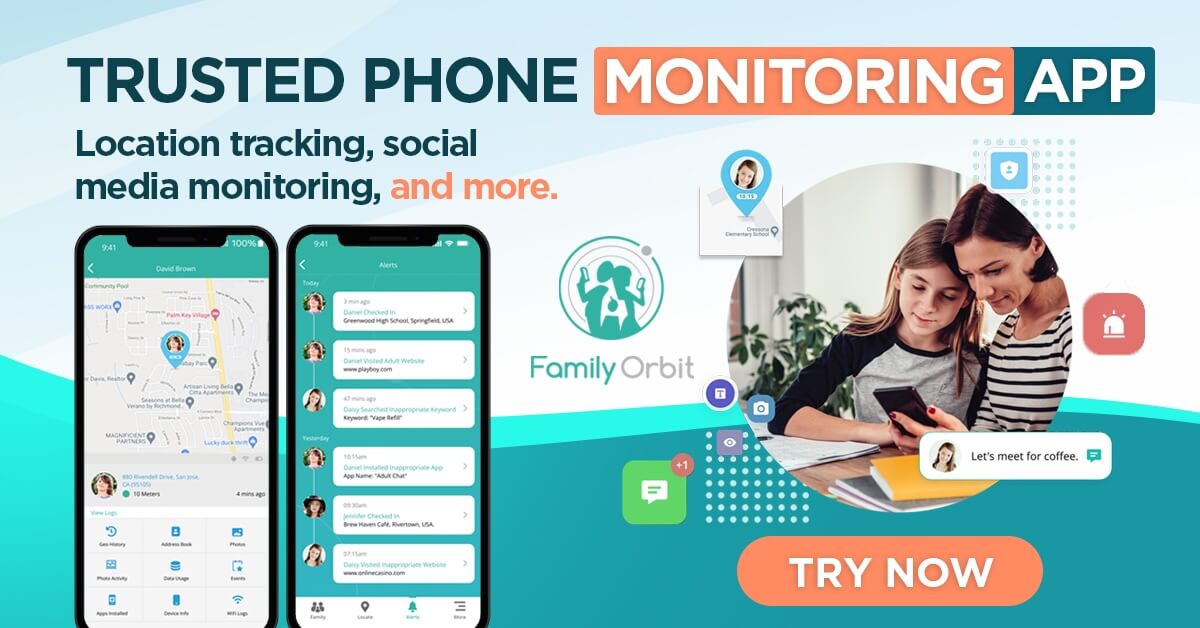
Family Orbit is a trusted parental control and family monitoring app designed to help parents protect their children in today’s digital environment. It allows you to keep an eye on your child’s phone activity, including WhatsApp messages, in a secure and consent-based way.
🔍 What Can You Monitor?
Using Family Orbit, parents can gain visibility into key communication channels to identify potential issues such as cyberbullying, online predators, or exposure to harmful content. The app enables monitoring of:
- WhatsApp messages
- SMS and iMessages
- Call logs
- Websites visited
- Photos and videos
- Installed apps
- Contacts
🧑💻 How Does It Work?
To set up WhatsApp monitoring:
- Connect your child’s iPhone to a computer.
- Use Family Orbit’s desktop app to create a local encrypted backup of the device.
- The app then decodes the WhatsApp data from the backup securely.
- After setup, future backups will be generated automatically over Wi-Fi, allowing ongoing message monitoring without needing the device to be plugged in again.
This method respects Apple’s data access restrictions while still providing accurate insights for parental use.
🔐 Ethical Use & Consent Reminder
Family Orbit is intended for lawful parental monitoring of children’s devices. It should only be used where you are the device owner or have full consent, especially in jurisdictions with privacy laws governing digital surveillance.
Responsible and Ethical Use of Location Finding on WhatsApp
It’s legal for parents to use GPS tracking tools for children under 18. However, this doesn’t mean parents should constantly monitor them or do so without their consent. This can damage the trust and relationship between parents and children.
To help lower the risks of such issues, consider following these strategies.
Clear Communication and Consent
Whether they’re tweens or teens, talk to your children about how vital it is to share their locations.
Don’t use scare tactics; tell them it will help you feel less worried because you love them. They may be more willing to share their locations if you share yours.
Maintain Appropriate Boundaries
Once a loved one agrees to share their location with you, know when and when not to ask them about it.
Suppose WhatsApp shows your teen is at the mall and they haven’t broken their curfew. There’s no reason to message them asking what they’re doing or why they’re there. This can make them feel like you’re breaching their privacy.
However, if you see your teen somewhere they shouldn’t be, then, by all means, contact them.
Responsibly Track Your Loved Ones Today
Knowing how to track location from WhatsApp is something every parent should do. However, parents must still practice ethical and responsible strategies when monitoring their kids’ whereabouts.
If you’re ready to monitor your family, tell them why and set boundaries. This can help make everyone feel more at ease while letting them maintain some privacy.
And if you’re a parent who wishes to implement better digital safety and privacy at home, try Family Orbit today. You can do so for free and, from there, decide which plan best suits your household!
- Monitor Calls & Text Messages
- View Photos and Videos
- Location Tracking & Geofence
- Monitor WhatsApp & Kik
- Detect & Alert for Inappropriate Activities
- Monitor Websites Visited
- Compatible with Android and iOS


![5 Ways To See Deleted WhatsApp Messages On Android Phones [100% Works]](https://www.familyorbit.com/blog/wp-content/uploads/2024/03/view-deleted-whatsapp-messages-android-300x180.jpg)


![How to Track a Stolen Phone Using WhatsApp [Must Read]](https://www.familyorbit.com/blog/wp-content/uploads/2024/01/track-phone-using-whatsapp-300x180.jpg)