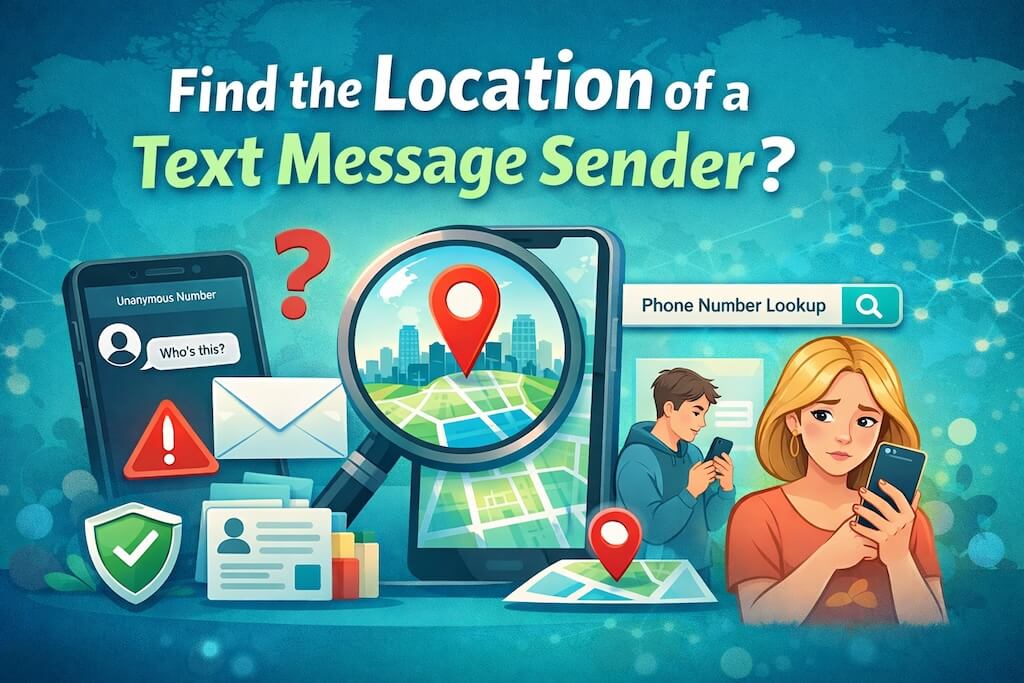
A strange text pops up from a number you don’t recognize. Maybe it’s harmless. Maybe it isn’t. But that question — “Can I find where this text came from?” — hits hard when it’s your kid’s phone. Especially at 11:37 p.m.
You’re not the only one asking.
Parents, partners, even coworkers want to know who’s on the other end. And more importantly, where they might be. It’s not about snooping — it’s about safety.
Here’s the truth: while you can’t get someone’s exact GPS from a text message alone, you can find out where a phone number is registered, which carrier it uses, and sometimes who it belongs to. And you don’t need a computer science degree or a dark web membership to do it.
With the right phone lookup tools, it’s actually pretty simple.
Family Orbit – Number Tracker
Reverse Phone Lookup
See who may be behind an unknown number before you call back.
Why Would You Want to Find Out Where a Text Came From?
Peace of mind. That’s the biggest reason. Especially when kids are involved. They don’t always know who they’re texting — or who’s texting them. And in today’s world, texts aren’t just words. They’re doors. Sometimes, to places we never want our kids walking into.
Here are a few real reasons people want to look up where a text message came from:
- To check if a number is linked to a scam or spam.
- To know if a text came from a business or a real person.
- To see if a contact is hiding behind a fake number.
- To gather info before responding to a stranger.
- To talk to your teen about who they’re messaging — with facts, not guesses.
- To stay calm when you’re not home, but something feels off.
Sometimes, you don’t need their full address. Just knowing the city, state, or who owns the number can help you sleep better.
The good news? You don’t have to go in blind. The next section walks you through real tools that can help — some are free, some are paid, and some you’ve probably never heard of.
What You Can and Can’t Find from a Text Message Sender’s Location
Let’s set the record straight.
A text message doesn’t carry GPS data. That means you can’t just click something and see exactly where the sender is standing. No red pin, no street view, no secret shortcut. That’s not how phones work — no matter what some shady apps claim.
But here’s the part that matters:
You can find out a lot about the phone number itself, which often points you in the right direction.
Think of it like this: if a phone number were a return address, a reverse phone lookup is the envelope. You won’t get someone’s house key, but you’ll get the ZIP code, the name on the label, and maybe even a peek at past senders.
Here’s what reverse lookup tools can actually tell you:
What You Can Find Out
- City or region where the phone number is registered
- Which carrier or service the number is using
- Whether it’s a mobile or landline
- If it’s listed as a known spammer, telemarketer, or scam number
- In some cases: the owner’s name (if public)
- For business numbers: company name, website, and reviews
This info is usually enough to spot red flags fast. If your child says they’re texting a friend from school, but the number shows up as a burner phone from another state — that’s a flag—a big one.
What You Can’t Get (Legally or Honestly)
- Live GPS location
- Exact address of the sender
- Private texts or call logs (unless you’re using a parental monitoring app with permission)
- Hack-style tracking (those are scams — or worse)
Any app or site that says you can track someone’s real-time location from a phone number without consent? Walk away. That’s either fake, spyware, or a setup to break privacy laws.
🛑 Safety Tip: If a site asks you to install a weird app, type in your own phone number, or “verify” by downloading something — it’s not legit.
In the next section, you’ll see real tools that actually work — ones that have been tested, trusted, and don’t play games with your privacy.
The Best Free & Paid Tools to Find the Location of a Text Message Sender
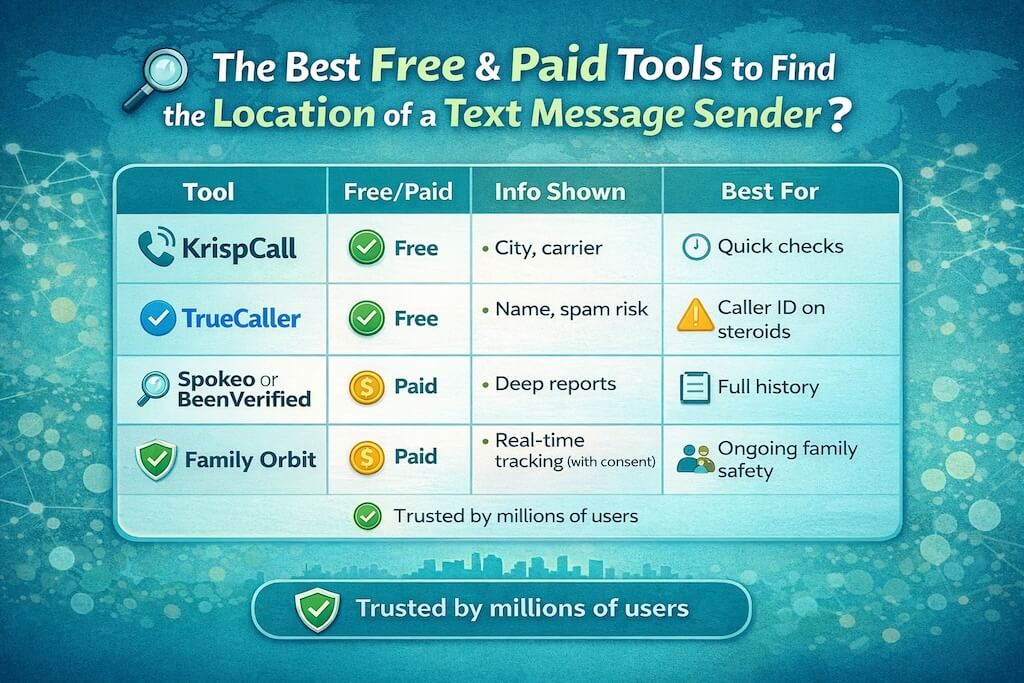
You don’t need to be a techie or spend hours digging through shady websites. These tools actually work — some are free, some charge a few bucks — but they all give you real information about unknown numbers.
These aren’t random picks. They’ve been tested. Used by millions. And yes, they help you find out where a text message came from — the legal, safe way.
1. KrispCall Reverse Phone Lookup (Free)
If you’re looking for fast answers and don’t want to sign up for anything, start here.
- What it shows: General location (city/state), carrier, number type
- Good for: Checking if the number is real, spam, or even VoIP
- Why it works: Pulls from clean telecom data — no shady scraping
- No app required, just type the number on their website
Use it when: Your kid gets a random text, and you want to know if it’s from California or Cameroon.
2. TrueCaller
This one’s like a caller ID upgrade — it has a giant database of user-reported numbers.
- What it shows: Name (if reported), type of caller, country, spam risk
- Good for: Identifying known scam numbers or businesses
- Bonus: You can install it on your phone and screen calls/texts in real time
Heads-up: Not always 100% accurate for newer numbers, but great at catching red flags early.
3. BeenVerified / Spokeo / Intelius (Paid)
These are full background check tools, and they go a few layers deeper.
- What they show: City, possible name, past locations, criminal records, social profiles
- Good for: Digging deeper if you think the number belongs to someone pretending to be someone else
- Pricing: Usually around $5 to $10 per report or subscription-based
Use with care — only for legit safety checks. Not for stalking your ex’s new friend.
4. Family Orbit (For Ongoing Safety Monitoring)
Reverse lookup is great for one-time checks. But what if you want ongoing peace of mind?
That’s where Family Orbit comes in.
If the phone is your child’s — or you have their consent — you can:
- See who they’re texting
- Get alerts for unknown or dangerous numbers
- Monitor GPS location (with permission)
- Track usage patterns and app activity
- Set healthy boundaries without constant confrontation
Why it’s different: Family Orbit doesn’t just show you one number — it shows the whole picture, in real time, without invading your child’s privacy.
“Think of it like checking your child’s backpack — not reading their diary.”
⚠️ A Word About Scam Tools
Some sites claim they’ll give you the exact location of a phone number for free. Spoiler: they won’t.
If a site:
- Promises live tracking with no consent
- Asks for your personal info up front
- Pushes suspicious apps or downloads
🚨 That’s a red flag. Close the tab.
Stick with tools that are upfront about what they offer. You don’t need to trade your privacy to protect your child’s.
What About Family Members? Tracking with Consent

Looking up a number is one thing. But what if the phone isn’t a stranger’s?
What if it belongs to your child?
That changes everything.
When you’re the parent — or the account holder on the phone — and your kid is still under your roof, you’re not being nosy. You’re being responsible. These days, parenting comes with passcodes.
So, while reverse lookups help you figure out where a text might’ve come from, they won’t tell you what’s really going on. That’s where a tracking app with full consent comes into play.
Why Consent-Based Tracking Is Different
It’s not about spying. It’s not about control.
It’s about having the tools in place before something goes sideways. Like smoke detectors — you install them hoping they never go off.
With Family Orbit, you can:
- See who your child is texting (on Android)
- Get alerts for suspicious numbers
- Track their phone’s GPS location (with full permission)
- Get peace of mind without taking their phone away
- See patterns — like late-night usage or new contacts
Think of it as giving your child a seatbelt for the internet.
They still get privacy. But you get awareness. That’s how trust stays intact — and that’s what keeps families strong.
Talk First, Then Track
The best time to set this up? Before there’s a problem.
Have a simple, clear conversation:
“This isn’t about reading your texts. It’s about knowing you’re safe. If something weird happens — I want to be able to help, fast.”
Set boundaries together. Talk about why safety tools matter. Show them you’re not reacting out of fear — you’re preparing with love.
Tools Like Family Orbit Work Best When:
- You’re giving your child their first smartphone
- You’re worried about online friends or influencers
- Your teen is becoming more independent
- You want visibility without constant confrontation
And yes — Family Orbit works discreetly, runs in the background, and keeps your child’s data private and secure. No selling info. No creepy trackers. Just what’s needed, when it’s needed.
Can You Trace a Phone Number to a Location in Real-Time?

Let’s clear up the biggest myth out there.
You cannot trace a phone number’s real-time location just by typing it into a website. No matter how many sketchy ads promise it.
There’s no map that magically shows where someone is just because you have their number. Not legally. Not accurately. And definitely not for free.
What Fake Tracking Sites Say
You’ve probably seen it:
“Enter the number and see their live location instantly!”
Click a few buttons and boom — the website says the person is on Main Street, eating a sandwich.
Except… it’s all fake.
They either:
- Guess a general city from the area code (which you could get from Google in 2 seconds), or
- Push you into endless surveys or shady downloads
These sites are designed to get your info, not theirs. And in the worst cases, they plant spyware on your device.
What’s Actually Possible
Here’s what’s real:
- Law enforcement can access carrier-based location in emergency situations
- Apps like Find My iPhone or Google Family Link can show GPS — but only if the person has shared it with you
- Parental monitoring tools (like Family Orbit) can show real-time location with consent and setup
- Reverse lookup tools can show the general registration region — not real-time movement
That’s it.
Anyone promising more is either breaking the law — or lying to you.
When Real-Time Tracking Is Legit
If your child has a phone, and you’re the account owner, you can install a safety app — with their knowledge — to keep track of where they are.
This isn’t just about checking up. It’s about being ready if something goes wrong.
“Mom, I’m fine” hits different when the map says otherwise.
Family Orbit gives you that option — live location updates, geofencing alerts, and the ability to know when your child gets to school, home, or somewhere they shouldn’t be.
If you want real-time GPS, the phone has to agree — either through permission or setup.
There’s no secret code. No hacker trick. Just smart tools, used the right way.
Legal & Safety Guidelines (Must-Read Before You Track)
Here’s the truth nobody tells you until it’s too late: tracking someone’s phone without their knowledge can be illegal.
Even if your intentions are good.
Even if you’re just trying to protect your child.
That’s why it’s critical to understand the line between safety and surveillance — and how to stay on the right side of it.
What’s Not Legal (or Safe)
Avoid these like the plague:
- Trying to get GPS location without consent
- Using software that claims to “hack” or “spy” on a phone remotely
- Tracing a number that doesn’t belong to your child, spouse, or someone under your care
- Using tracking tools on an ex, co-worker, neighbor, or anyone without a valid reason or their permission
- Faking an emergency to get phone location data from law enforcement or carriers
Those are the kinds of moves that lead to lawsuits — or worse. Even if it starts with good intentions.
What Is Okay to Do
You’re in the clear when:
- You use reverse lookup tools to check a number’s general info (public record data)
- You track your minor child’s device, with your account ownership or their permission
- You set up a mutual agreement with a partner or family member to share GPS locations
- You use apps like Family Orbit with consent, and for safety purposes only
- You use monitoring tools in a transparent and respectful way
The goal isn’t control. It’s care. And the law makes a clear difference between the two.
Helpful Resources
To stay safe and smart:
- Federal Trade Commission – Online Tracking & Privacy
- Child Online Safety Guidelines (NCMEC)
- Your local state laws on digital surveillance and consent
Final Thoughts: Skip the Hype, Use What Works
When a strange text shows up, the last thing you need is confusion.
You need answers. Fast. Safe. Real.
Not clickbait. Not shady apps. Not promises of some magical GPS trace that doesn’t actually exist.
So let’s bring it all together.
If you’re trying to find the location of a text message sender, here’s what matters:
🧭 Use tools that work:
- KrispCall for free, fast location lookups
- TrueCaller to spot spam or fake numbers
- Spokeo or BeenVerified if you need deeper info
- Family Orbit for ongoing safety when it’s your child or loved one, and you’ve got consent
⚠️ Avoid anything that:
- Promises real-time GPS from a number
- Tries to trick you into downloading unknown apps
- Doesn’t clearly explain what it does or who owns it
There’s enough noise online already. You don’t need more fear or fiction.
You just need a plan.
If that plan includes keeping your family safe, Family Orbit is ready to help. You won’t need to be a hacker. You won’t need to break trust. You’ll just have the tools to know what’s happening — and act when it matters most.
- Monitor Calls & Text Messages
- View Photos and Videos
- Location Tracking & Geofence
- Monitor WhatsApp & Kik
- Detect & Alert for Inappropriate Activities
- Monitor Websites Visited
- Compatible with Android and iOS


![12 Best Free Cell Phone Tracker by Number Apps [Updated]](https://www.familyorbit.com/blog/wp-content/uploads/2023/11/free-cell-phone-tracker-apps-300x180.jpg)
![How to Delete Incognito History From Your Device: [Safeguard Your Privacy]](https://www.familyorbit.com/blog/wp-content/uploads/2023/08/how-to-delete-incognito-history-from-your-device-300x180.jpg)